
Sphere Section Demonstration
Loading the math board and drawing, please wait…
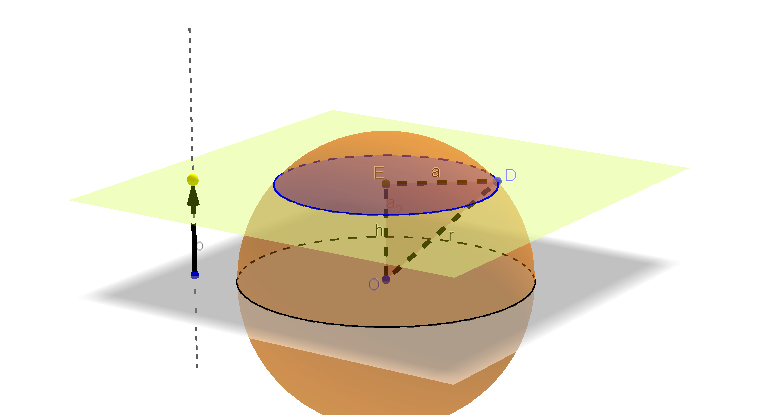
This example demonstrates the formation and properties of a sphere's cross-section. It involves core mathematical concepts such as sphere geometry, cross-sectional shapes, symmetry, and spatial geometric relationships. The construction highlights GeoGebra commands and objects like Circle, Sphere, OrthogonalLine, Point, Vector, Plane, IntersectPath, Intersect, Segment, and Polygon. Suitable for high school and above, focusing on solid geometry, analytical geometry, and spatial visualization skills.
GeoGebra Commands & Parameters
Circle(O, 3, zAxis) → cSphere(O, 3) → a_2OrthogonalLine(B, xOyPlane) → bPoint(b) → CVector(B, C) → uPlane(C, xOyPlane) → dIntersectPath(d, a_2) → ePoint(e) → DIntersect(zAxis, d) → ESegment(D, E) → aSegment(D, O) → rSegment(O, E) → hPolygon(O, E, D) → poly1, h_2, a_1, e_1
AI Drawing Prompt Reference
Draw a sphere centered at the origin with radius 3, and show its cross-section formed by intersecting it with a plane. The intersection is a circle. Start by drawing a line perpendicular to the xOy plane, intersecting the sphere at point D. Then draw a vertical line from D to intersect the xOy plane at point E. Connect D to E, D to the origin O, and O to E with line segments. Finally, fill the triangle OED and draw the segments DE, DO, and OE to highlight the relationship between the cross-section and the sphere.
The prompt above was compiled from the original drawing commands and is for reference only.