
Sphere Cross-Sections
Loading the math board and drawing, please wait…
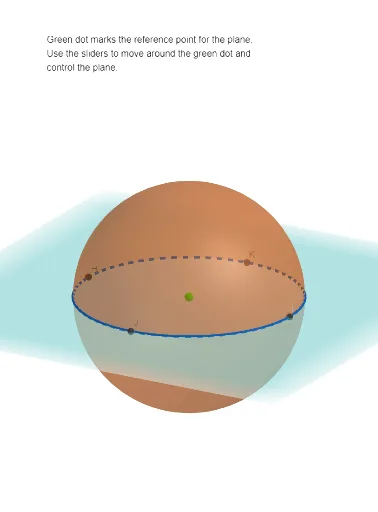
This example helps visualize the cross-sections of a sphere. By adjusting the sectioning plane with sliders, you can see the cross-sections in real time. Key mathematical concepts include spheres and section geometry. Commands used include Intersect, Point, Sphere, Ray, and OrthogonalPlane. Suitable for high school geometry education.
GeoGebra Commands & Parameters
Intersect(xAxis, zAxis) → FIntersect(xAxis, zAxis) → APoint(zAxis) → BSphere(A, 4) → aRay(G, C) → fOrthogonalPlane(G, f) → pIntersectPath(p, a) → dVertex(d) → H, I, J, K
AI Drawing Prompt Reference
Create a 3D geometry demonstration showing a sphere with radius 4 centered at the origin. Define a ray passing through the sphere, then construct a movable cutting plane perpendicular to that ray. Show the circular cross-section where the plane intersects the sphere, with the circle highlighted in a distinct color. Add sliders to adjust the plane's position so the cross-section changes size in real time. Display coordinate axes for reference, and mark several points on the intersection circle to illustrate the geometry of sphere sections.
The prompt above was compiled from the original drawing commands and is for reference only.