
Pyramid Cross-Sections
Loading the math board and drawing, please wait…
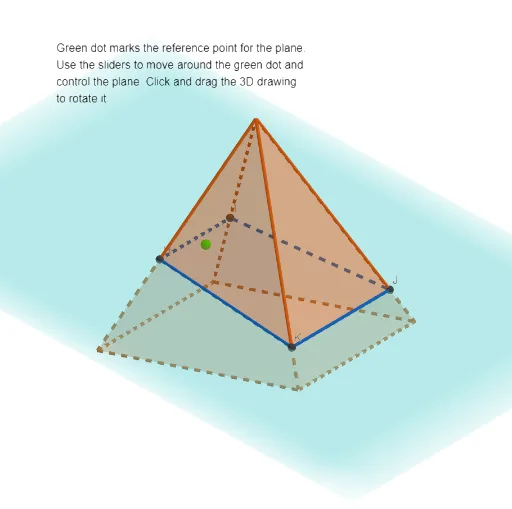
This example helps visualize the cross-sections of a pyramid. By adjusting the sectioning plane with sliders, real-time cross-sections are displayed. Key mathematical concepts include the intersection of a plane with a solid. GeoGebra commands used include Intersect, Point, Ray, OrthogonalPlane, Pyramid, etc. Suitable for middle school and above students or teachers for teaching purposes.
GeoGebra Commands & Parameters
Intersect(xAxis, zAxis) → FIntersect(xAxis, zAxis) → APoint(zAxis) → BRay(G, C) → fOrthogonalPlane(G, f) → pPoint(Circle[M, Distance[L, M], Segment[L, M]]) → NPyramid((-2, -2), (-2, 2), (2, 2), (2, -2), (0, 0, 4)) → a, face1, edge5, edge6, edge7, edge8, face2, face3, face4, face5, edge1, edge2, edge3, edge4IntersectPath(p, a) → poly1, H, k, I, J, K, O, g, h, i, j
AI Drawing Prompt Reference
Draw a pyramid with a rectangular base and a point apex, and show an adjustable cross-section plane. Adjust the plane's position using a slider to display real-time cross-sections of the pyramid. The intersection between the plane and the pyramid should be clearly visible as lines, and the cross-section shapes should update dynamically as the plane moves.
The prompt above was compiled from the original drawing commands and is for reference only.