
Sort Fractions and Decimals (NS1b-02-P4-Q7)
Loading the math board and drawing, please wait…
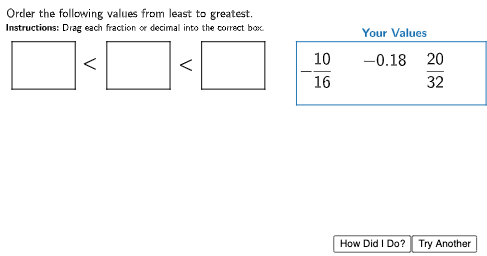
This interactive GeoGebra exercise demonstrates how to arrange fractions and decimals in ascending order. It focuses on converting between fractions and decimals, comparing magnitudes, and applying ordering logic. The construction uses Random and RandomElement commands to generate random values, Shuffle to randomize the sequence, and Polygon/Point objects to create draggable answer boxes. ValueBox and AnsBox handle user input, while TryAnother and HowDidIDo buttons provide new problems and step-by-step feedback. Suitable for upper primary or lower secondary students to reinforce number sense and comparison skills.
GeoGebra Commands & Parameters
Polygon((9, 5), (15, 5), (15, 3), (9, 3)) → ValueBox, f, g, h, iPolygon((0, 5), (2, 5), (2, 3.5), (0, 3.5)) → AnsBox1, j, k, l, mPolygon((3, 5), (5, 5), (5, 3.5), (3, 3.5)) → AnsBox2, n, p, q, rPolygon((6, 5), (8, 5), (8, 3.5), (6, 3.5)) → AnsBox3, s, t, a, bPolygon(Point1, Point1 + (1.5, 0), Point1 + (1.5, -1.3), Point1 + (0, -1.3)) → DragBox1, c, d, e, l_1Polygon(Point2, Point2 + (1.5, 0), Point2 + (1.5, -1), Point2 + (0, -1)) → DragBox2, f_1, g_1, h_1, m_1Polygon(Point3, Point3 + (1.5, 0), Point3 + (1.5, -1.3), Point3 + (0, -1.3)) → DragBox3, i_1, j_1, k_1, n_1RandomElement(DenValues) → den1Random(1, den1 - 1) → num1Random(0, 1) → value1signRandom(0, 1) → value2signRandomElement(DenValues) → den2Random(1, den1 - 1) → num2Random(0, 1) → typeindexShuffle({(9, 4.75), (11, 4.75), (13, 4.75)}) → PointsList, {(13, 4.75), (11, 4.75), (9, 4.75)}