
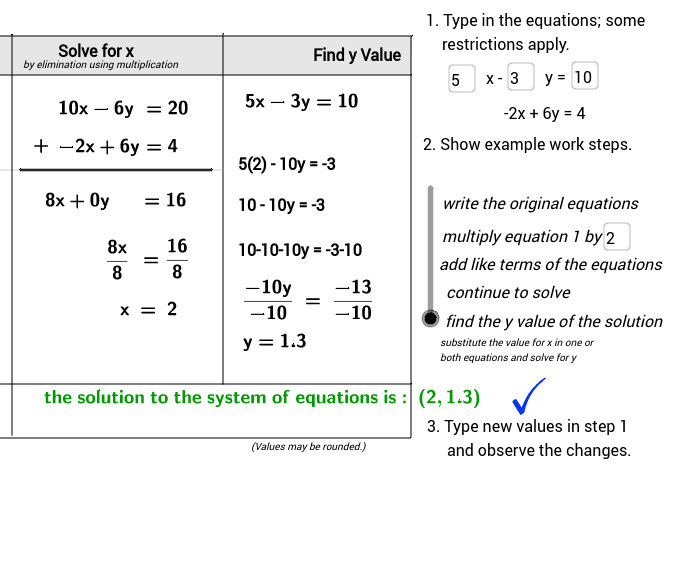
Solve the system by elimination using multiplication
Loading the math board and drawing, please wait…
This example demonstrates how to solve a system of linear equations using elimination with multiplication. Key math concepts include linear equations, elimination method, multiplication operations, and equation solving. GeoGebra commands like If, Textfield, Polygon, Segment, Vector are used, along with objects such as coefX, coefLPlus1, solveHead. Suitable for middle school mathematics teaching and learning basic linear algebra concepts.
GeoGebra Commands & Parameters
If(coefX + 1 ≟ 1, "", If[coefX + 1 ≟ -1, "-", "" + (coefX + 1) + ""]) → coefLPlus1Textfield(coefX) → inputCoefXTextfield(const) → inputConstTextfield(mult) → inputMultTextfield(coefY) → inputCoefYPolygon((-5.02, 6.2), (7.98, 6.2), (8, 6.98), (-5, 6.98)) → row1Header, a, b, c, dSegment((x(Corner[solve1a_1, 1]) - 0.6, 4.3), (x(Corner[solve1a_2, 2]) + 0.3, 4.3)) → step1segmentSegment((4.22, 0.02), (4.22, 7.02)) → segmentDividerSegment((-1.8, 4.3), (4.2, 4.3)) → divider1aSegment((-5.04, -1.06), (7.96, -1.06)) → bottomSegment((0, -1), (0, 7)) → sideLSegment((7.98, -1.04), (7.98, 6.96)) → sideRSegment((-5.02, 0.02), (7.98, 0.02)) → dividerSolutionVector(Corner[multEqn3, 1] + (-0.2, 0.4), Corner[solve1a_2, 2] + (0.2, 0.2)) → multEqnVectorIf(mult * coefX - 2 ≟ 0 ∧ -mult * coefY + 6 ≟ 0, true, false) → solutionNoneIf(mult * coefY ≠ 6, true, false) → notValid
AI Drawing Prompt Reference
Draw a coordinate system with two lines and their intersection point. First, draw the first line with slope coefX and y-intercept const, then draw the second line with slope mult * coefX and y-intercept mult * const. Next, draw a rectangular box to indicate the solution area. Finally, draw two auxiliary lines, one horizontal and one vertical, to help locate the solution position.
The prompt above was compiled from the original drawing commands and is for reference only.