
Solve a System of Equations by Addition Combination
Loading the math board and drawing, please wait…
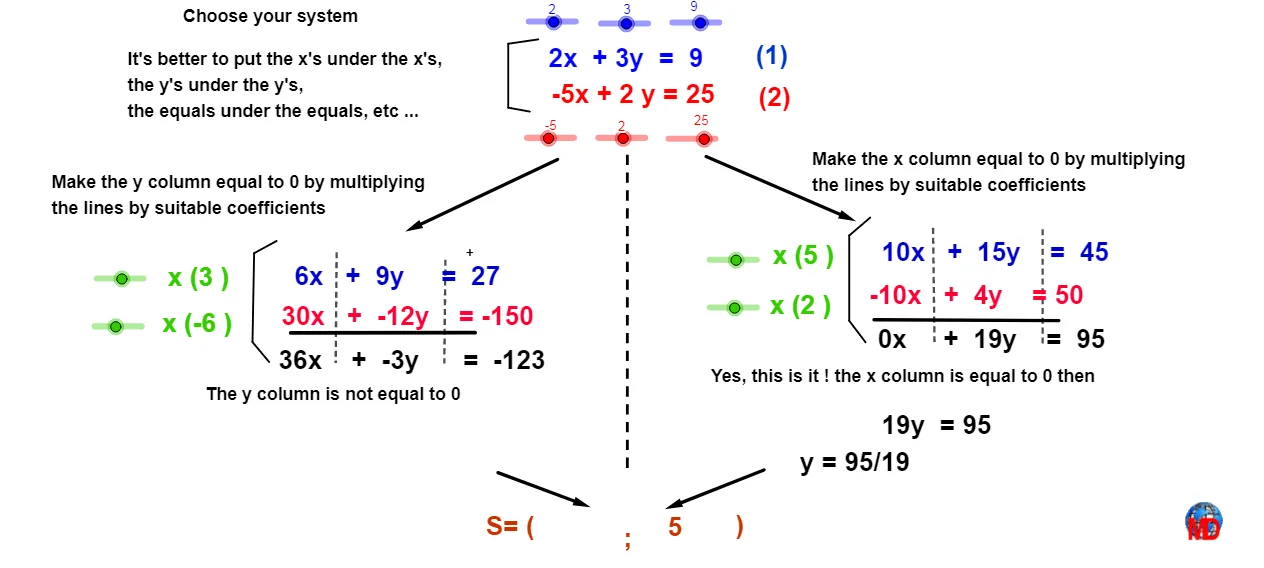
① This example demonstrates how to solve a system of linear equations using the addition (elimination) method, and visually shows that the intersection point of two lines is the solution. ② Core math concepts include systems of linear equations, elimination method, line intersection, and coordinate geometry. ③ Construction highlights: GeoGebra commands such as Intersect (to find the intersection of lines), Point (to mark key points), Vector and Segment (to construct vectors and segments for visual aid), and If (possibly for conditional display); objects include lines a, b, c, etc., points A, B, C, etc., and multiple triangle regions T9–T19, indicating auxiliary polygons in the construction. ④ Suitable for middle and high school students learning algebra and coordinate geometry, useful for understanding the geometric meaning of elimination, and as a classroom demonstration tool.
GeoGebra Commands & Parameters
Intersect(d, h) → APoint(h) → BPoint(d) → CVector(D, E) → uVector(F, G) → vSegment(H, I) → mSegment(J, K) → nSegment(L, M) → pSegment(N, O) → qSegment(O, P) → rSegment(N, Q) → sSegment(R, S) → tSegment(R, T) → a1Segment(S, U) → b1Segment(V, W) → c1Segment(W, Z) → d1Segment(A1, V) → e1Vector(A_1, B_1) → u_1Vector(C_1, D_1) → v_1Segment(E_1, F_1) → f_2Segment(G_1, H_1) → g_2Segment(I_1, J_1) → h_2Segment(K_1, L_1) → i_2If(b < 0, "", "+") → texte7If(f < 0, "", "+") → texte8
AI Drawing Prompt Reference
Draw two lines a and b, and their intersection point A is the solution. Then place points B and C on lines h and d respectively. Construct vectors u and v, and line segments m, n, p, q, r, s, t, a1, b1, c1, d1, e1, f1, g1, h1, and i1. Finally, display the plus sign based on the signs of b and f.
The prompt above was compiled from the original drawing commands and is for reference only.