
Solid of Revolution (Sine Curve)
Loading the math board and drawing, please wait…
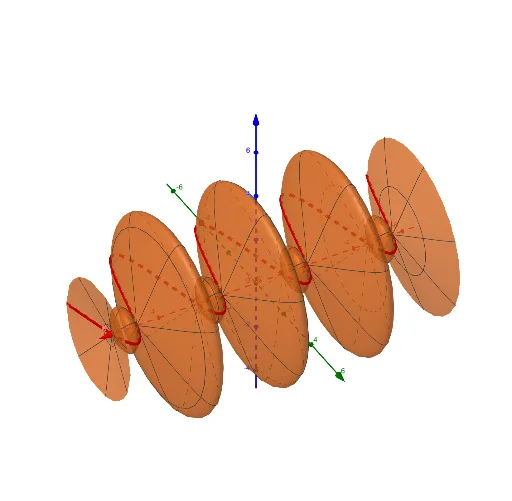
①This example demonstrates the 3D solid generated by rotating the sine curve y = sin(x) about the x-axis, visually linking a 2D function to its 3D surface of revolution. ②Core mathematical concepts include solids of revolution, definite integrals for volume computation, trigonometric functions, and parametric surface representation in three-dimensional space. ③Construction highlights: using GeoGebra's Surface command with parameters r, a, b, c, d, f, and e to control the rotation angle, curve domain, and mesh resolution, producing a smooth 3D surface; r likely denotes the radius or parameter, a and b define the x-interval, c and d set the angular sweep, while f and e serve as auxiliary controls. ④Suitable for advanced high school or college calculus courses when teaching volumes of revolution, surface plotting, and parametric equations, as well as for mathematical visualization labs to help students grasp the dynamic transformation from a 2D curve to a 3D object.
GeoGebra Commands & Parameters
Surface(f, r, xAxis) → e
AI Drawing Prompt Reference
Create a 3D solid of revolution by rotating the sine curve y = sin(x) around the x-axis. Start with the 2D sine wave over a defined interval, then revolve it fully around the x-axis to generate a smooth, rippled surface resembling a series of stacked rings. The surface should have a moderate mesh resolution to clearly show its three-dimensional form, emphasizing the transformation from a flat curve to a volumetric shape.
The prompt above was compiled from the original drawing commands and is for reference only.