
Solid of Revolution by Andreas Lindner
Loading the math board and drawing, please wait…
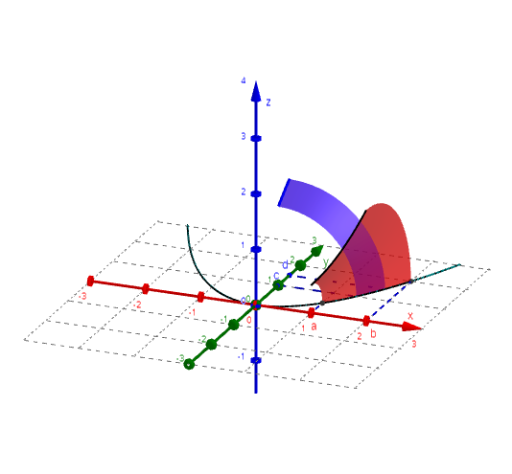
This example demonstrates the generation of a solid through rotation of a graph around the x- or y-axis. Key mathematical concepts include integral calculus and solid geometry. It utilizes various GeoGebra commands such as curve drawing, rotation, and surface generation. Suitable for high school mathematics education and learning.
GeoGebra Commands & Parameters
Textfield(f) → Textfeld1Textfield(a) → Textfeld2Textfield(b) → Textfeld3Line((0, c), Vector[(1, 0)]) → g_1Intersect(f, g_1, (1, f(1))) → ILine((0, d), Vector[(1, 0)]) → g_2Intersect(f, g_2, (d, f(d))) → JCurveCartesian(t, f(t), 0, t, -5, 5) → kTextfield(c) → Textfeld4Textfield(d) → Textfeld5Segment(A, G) → s_1Segment(B, F) → s_2Surface(u, (f(u) * cos(w)), (f(u) * sin(w)), u, a, b, w, 0, φ) → f_xInvert(f) → f_uSegment(C, I) → s_3Segment(D, J) → s_4Rotate(If[a ≤ x ≤ b, f(x)], φ, xAxis) → k_xIf(f_u(c) < f_u(d), Rotate[If[f_u(c) ≤ x ≤ f_u(d), f], (-ϕ), yAxis], Rotate[If[f_u(d) ≤ x ≤ f_u(c), f], (-ϕ), yAxis]) → k_yIf(f_u(c) < f_u(d), Surface[(uu * cos(ww)), f(uu), (uu * sin(ww)), uu, f_u(c), f_u(d), ww, 0, ϕ], Surface[(uu * cos(ww)), f(uu), (uu * sin(ww)), uu, f_u(d), f_u(c), ww, 0, ϕ]) → f_y
AI Drawing Prompt Reference
Draw a solid of revolution by rotating a function graph around the x-axis or y-axis. First, draw a horizontal line and find its intersections with the function. Then plot the function curve and set the rotation angle. Generate the surface of the solid based on the function's range and consider different rotation directions. Finally, connect key points to form segments, showcasing the structure of the solid.
The prompt above was compiled from the original drawing commands and is for reference only.