
SOHCAHTOA in the Unit Circle
Loading the math board and drawing, please wait…
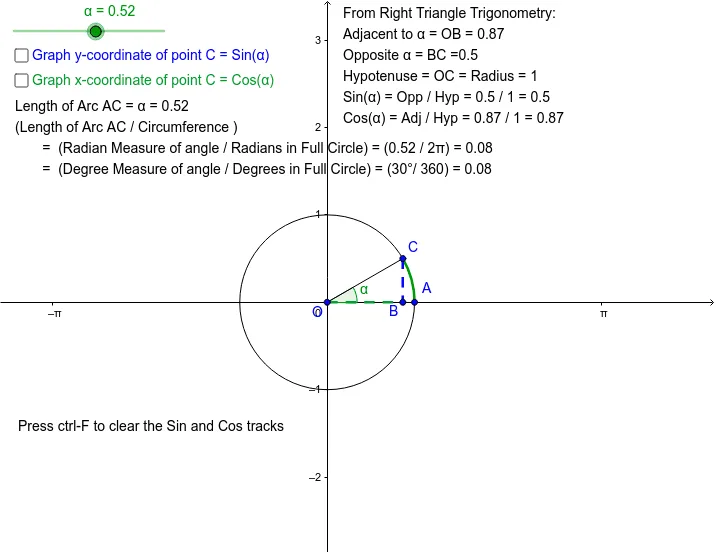
This example uses a slider to demonstrate the SOHCAHTOA concept in the unit circle, showing the corresponding right triangle. Students can observe how the trigonometric function values change with the angle. Key mathematical concepts include trigonometric functions, unit circle, and right triangles. GeoGebra commands used include Point, Intersect, Circle, Segment, Rotate, OrthogonalLine, Angle, and CircleArc. Suitable for middle school and above students learning trigonometry.
GeoGebra Commands & Parameters
Point(xAxis) → AIntersect(xAxis, yAxis) → OCircle(O, A) → cSegment(O, A) → aRotate(A, α, O) → CSegment(O, C) → bOrthogonalLine(C, xAxis) → dIntersect(d, xAxis) → BSegment(C, B) → YSegment(O, B) → XAngle(A, O, C) → βCircleArc(O, A, C) → AC
AI Drawing Prompt Reference
Draw a unit circle centered at the origin with a radius to a point on the circle. Rotate the radius by an angle α to get another point, forming a line segment. Draw a perpendicular line from the rotated point to the x-axis, marking the intersection point. Connect the rotated point and the intersection to form a right triangle. Label the angle and sides of the triangle, and draw an arc between the two points on the circle. Use a slider to change the angle α and observe the changes in the triangle and arc.
The prompt above was compiled from the original drawing commands and is for reference only.