
SOH-CAH-TOA Failed?
Loading the math board and drawing, please wait…
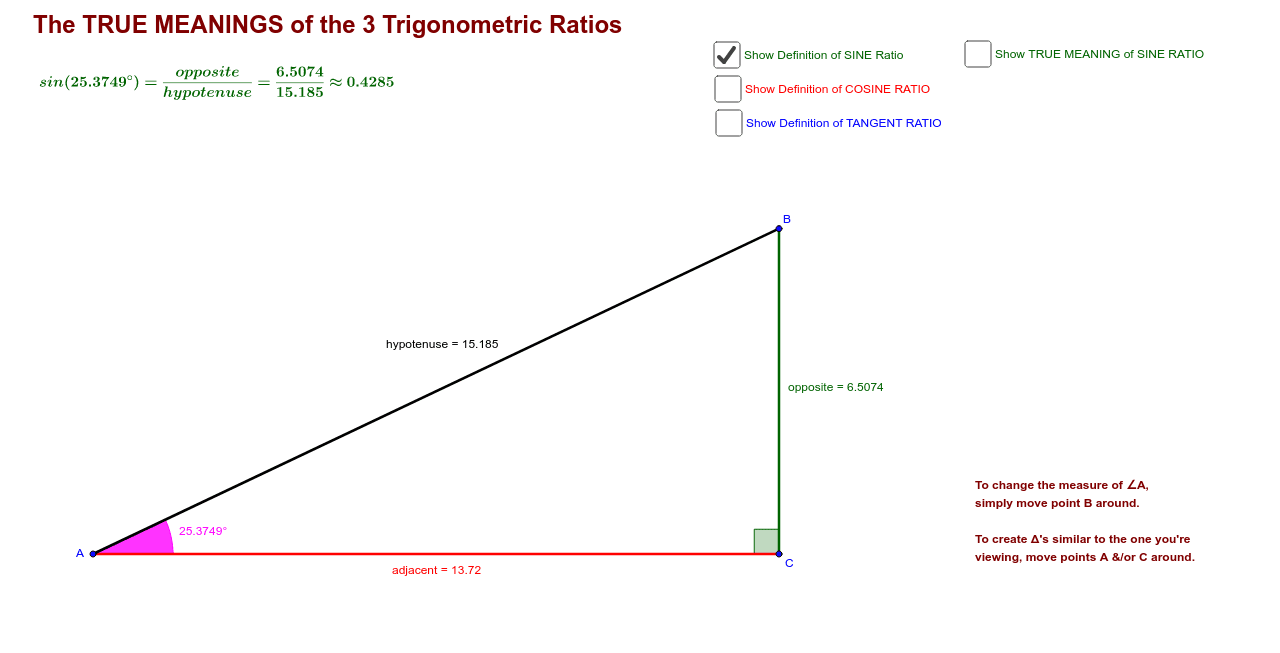
This example demonstrates the practical application of trigonometric functions through geometric construction, correcting the limitations of memorizing the SOH-CAH-TOA mnemonic. Core mathematical concepts include sine, cosine, and tangent. Using commands like Segment, OrthogonalLine, and Point from the construction summary, it shows how to use GeoGebra to draw a right triangle and its angles. Suitable for middle school and above students learning trigonometry and geometric construction.
GeoGebra Commands & Parameters
Segment(A, C) → adjacentOrthogonalLine(C, adjacent) → bPoint(b) → BSegment(A, B) → hypotenuseSegment(C, B) → oppositeCircle(A, C) → eCircle(B, C) → fCircle(C, B) → gIntersect(g, adjacent, 1) → D_1Intersect(e, hypotenuse, 1) → EIntersect(f, hypotenuse, 1) → FCircleArc(B, F, C) → hCircleArc(A, C, E) → kCircleArc(C, B, D_1) → pAngle(C, A, B) → αPoint(p) → GPoint(h) → DPoint(k) → ISegment(C, G) → oppSegment(A, I) → adjSegment(B, D) → aMidpoint(a) → HMidpoint(a) → JVector(K, J) → uMidpoint(adj) → LVector(K, L) → vMidpoint(opp) → OVector(K, O) → u_1Angle(B, C, A) → βVector(P, D) → rVector(Q, I) → sVector(R, S) → v_1Vector(T, U) → w_1Vector(V, G) → b_1Vector(W, Z) → c_1
AI Drawing Prompt Reference
Draw a right triangle with a perpendicular side, a hypotenuse, and a line segment perpendicular to the perpendicular side. First, draw the perpendicular side, then the perpendicular line segment, and connect the endpoints to form the hypotenuse. Next, mark the right-angle vertex and use arcs to connect points on the hypotenuse to show angle relationships. Finally, label points on the perpendicular side and hypotenuse, and connect them with line segments to display the triangle's parts.
The prompt above was compiled from the original drawing commands and is for reference only.