
Smart Rock Paper Scissors Lizard Spock
Loading the math board and drawing, please wait…
In collections
Rock Paper Scissors type games
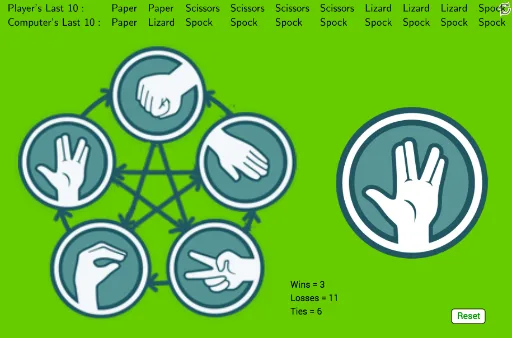
① This example demonstrates an interactive implementation of the extended game 'Rock Paper Scissors Lizard Spock' in GeoGebra, where a player competes against the computer and the last 10 moves are recorded. ② Core mathematical concepts include probability and statistics (random moves, frequency counting), logarithmic and exponential functions (possibly used for smart strategies or scoring), Poisson distribution (for modeling random events), step functions (for discrete state transitions), and dilation transformations. ③ Construction highlights: from the summary, commands such as Circle, Last, Max, Reverse, If, TableText, Sort, and Length are used; objects include multiple points (A to T), an image (pic1), a button (button1), a list for the last 10 plays (last10play), and counters for each choice (cpaper, cscissors, clizard, crock, cspock). Conditional logic via If determines win/loss, and TableText displays results. ④ Suitable for middle school and above, this serves as a fun way to explore probability, algorithmic thinking, and interactive GeoGebra design.
GeoGebra Commands & Parameters
Circle(C, D) → spCircle(E, Radius[sp]) → roCircle(F, Radius[sp]) → paCircle(G, Radius[sp]) → scCircle(H, Radius[sp]) → liLast(play, Min[10, Length[play]]) → last10playMax(L1) → aReverse(Sort[L1]) → L2If(A1, "Lizard", "Z") → B1If(A2, "Paper", "Z") → B2If(A3, "Rock", "Z") → B3If(A4, "Scissors", "Z") → B4If(A5, "Spock", "Z") → B5TableText({Join[{{"Player's Last 10:"}, Reverse[last10play]}]}) → text2TableText({Join[{{"Player's Last 10:"}, last10play}]}) → text1Sort({B1, B2, B3, B4, B5}) → L4Last(comp, Min[10, Length[comp]]) → L5TableText({Join[{{"Player's Last 10:"}, L3}], Join[{{"Computer's Last 10:"}, L5}]}) → text3Length(comp) → dLength(play) → e
AI Drawing Prompt Reference
Create an interactive graphic showing the extended 'Rock Paper Scissors Lizard Spock' game, featuring player vs computer matchups and strategy analysis. Include circles representing different gestures, lists tracking the last 10 moves for both player and computer, and text displays for win/loss outcomes. Implement sliders and conditional logic for random choices and strategy calculations, along with charts for probability statistics and function relationships.
The prompt above was compiled from the original drawing commands and is for reference only.