
Dice Roll Sums & Averages: Simulation from Sequences to Bar Charts
Loading the math board and drawing, please wait…
In collections
Statistics Demonstrations
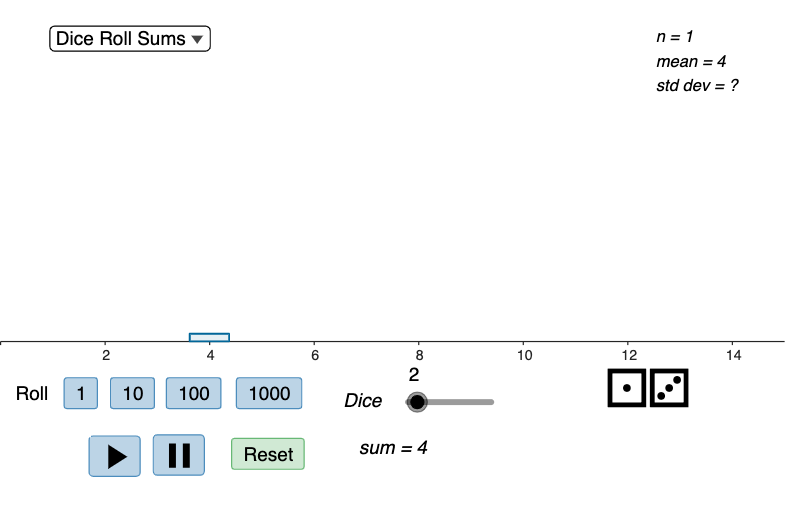
This GeoGebra example uses repeated dice-roll simulations to illustrate how the distribution of the sum and the average changes when rolling from 1 to 10 dice. It demonstrates the empirical view of probability distributions, the arithmetic mean, and how repeated experiments generate observable frequency patterns. The construction uses Sequence to generate the repeated outcomes and stores them in lists such as xList, diceRollList, and freqList. Max and Sum determine ranges and aggregate quantities, while mean computes the running or selected sample average (e.g., xListMean, freqListMean, currentMean). Conditional logic via If controls whether the display uses sums or averages (usingSum and calcType). For visualization, BarChart plots the frequency distribution, with Element selecting relevant data points and Text/VerticalText adding labels. Interactive controls like a roller and buttons (button1–button5) support stepping through experiments and updating totals (totalRolls, actualRolls). Suitable for middle school through early college probability & statistics, especially for classroom demonstrations of frequency distributions and the interpretation of averages from simulation data.
GeoGebra Commands & Parameters
Max(freqList) → freqMaxSum(freqList) → totalRollsSequence(Element[diceRollList, k], k, 1, numDice) → actualRollsSum(actualRolls) → currentSumIf(useSum, xList, xListMean) → selectedXListIf(useSum, freqList, freqListMean) → selectedFreqListIf(useSum, Max[xList], Max[xListMean]) → xListMaxIf(useSum, Min[xList], Min[xListMean]) → xListMinmean(actualRolls) → currentMeanBarChart(selectedXList, selectedFreqList, barWidth) → chartElement(unicodeDice, Element[diceRollList, 1]) → die1Element(unicodeDice, Element[diceRollList, 2]) → die2Element(unicodeDice, Element[diceRollList, 3]) → die3Element(unicodeDice, Element[diceRollList, 4]) → die4Element(unicodeDice, Element[diceRollList, 5]) → die5Element(unicodeDice, Element[diceRollList, 6]) → die6Element(unicodeDice, Element[diceRollList, 7]) → die7Element(unicodeDice, Element[diceRollList, 8]) → die8Element(unicodeDice, Element[diceRollList, 9]) → die9Element(unicodeDice, Element[diceRollList, 10]) → die10Text(die6 + die7 + die8 + die9 + die10) → dice6to10Text(die1 + die2 + die3 + die4 + die5) → dice1to5VerticalText(VerticalText[dice1to5]) → dice1to5AdjustedVerticalText(VerticalText[dice6to10]) → dice6to10Adjustedmean(actualRolls) → averageSum(actualRolls) → sumIf(useSum, sum, average) → diceCalculationIf(useSum, Text["sum = " + sum], "average= " + average) → diceCalculationTextIf(useSum, stdev[xList, freqList], stdev[xListMean, freqListMean]) → sigmaIf(useSum, mean[xList, freqList], mean[xListMean, freqListMean]) → muText("n = " + totalRolls + "\\n" + muText + "\\n" + sigmaText) → statText
AI Drawing Prompt Reference
Create a statistical chart simulating dice roll experiments. Display ten dice icons showing individual outcomes, grouped into two sets. Below, a bar chart plots possible sums or averages on the x-axis against their frequencies on the y-axis. Above the chart, show current statistics including total rolls, mean, and standard deviation. Include controls such as buttons and a slider to adjust the number of dice, toggle between sums and averages, and step through experiments. The visualization should clearly illustrate how the frequency distribution changes as more dice are rolled.
The prompt above was compiled from the original drawing commands and is for reference only.