
Slope Field Generator with Bifurcations
Loading the math board and drawing, please wait…
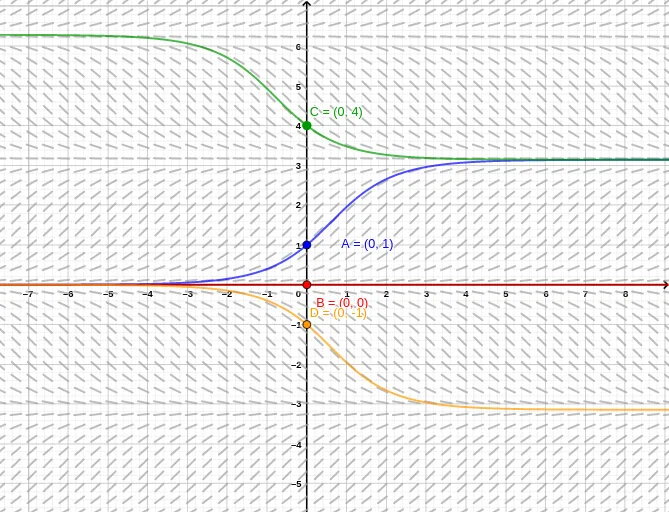
This example demonstrates how to visualize a first-order differential equation using a slope field (direction field), highlighting how bifurcation-like behavior emerges as initial conditions change. The key math ideas are ordinary differential equations, slope fields, numerical solution of ODEs, and numerical integration used to construct solution branches. Construction-wise, the workflow uses Textfield to define the function f from user input, SlopeField to draw the direction field over a chosen region, and SolveODE to numerically compute solutions from selected initial points. Multiple numericalIntegral objects (numericalIntegral1 through numericalIntegral8) are used to support the computation of the solution structure across different segments/branches, while showSF and showA–showD control which components (slope field and the different bifurcation branches) are displayed. It relies on parameter input boxes (InputBox1–InputBox5, InputBoxA–InputBoxC, InputBox2/3/4/5) and initial points A, B, C, D to trigger distinct solution behaviors. Suitable for high school through undergraduate calculus/ODE instruction and for interactive exploration in math modeling labs.
GeoGebra Commands & Parameters
Textfield(f) → InputBox1SlopeField(f, n, L) → slopefield1SolveODE(f, x(A), y(A), xmax, delta) → numericalIntegral1SolveODE(f, x(A), y(A), xmin, delta) → numericalIntegral2SolveODE(f, x(B), y(B), xmax, delta) → numericalIntegral3SolveODE(f, x(B), y(B), xmin, delta) → numericalIntegral4SolveODE(f, x(C), y(C), xmax, delta) → numericalIntegral5SolveODE(f, x(C), y(C), xmin, delta) → numericalIntegral6SolveODE(f, x(D), y(D), xmax, delta) → numericalIntegral7SolveODE(f, x(D), y(D), xmin, delta) → numericalIntegral8Textfield(delta) → InputBox2Textfield(A) → InputBoxATextfield(B) → InputBoxBTextfield(C) → InputBoxCTextfield(D) → InputBox3Textfield(amin) → InputBox4Textfield(amax) → InputBox5
AI Drawing Prompt Reference
Create a slope field (direction field) for a first-order differential equation, showing bifurcation-like behavior as initial conditions vary. The plot includes a direction field over a chosen region, with solution curves extending left and right from four distinct initial points, forming multiple branches. Input boxes allow adjusting the function, step size, initial point coordinates, and display range, while toggles control visibility of the field and branches. Construct by first drawing the slope field, then computing and plotting solution curves from each initial point, and finally adding parameter controls.
The prompt above was compiled from the original drawing commands and is for reference only.