
Phase Plane for a Linear System with Eigenvectors
Loading the math board and drawing, please wait…
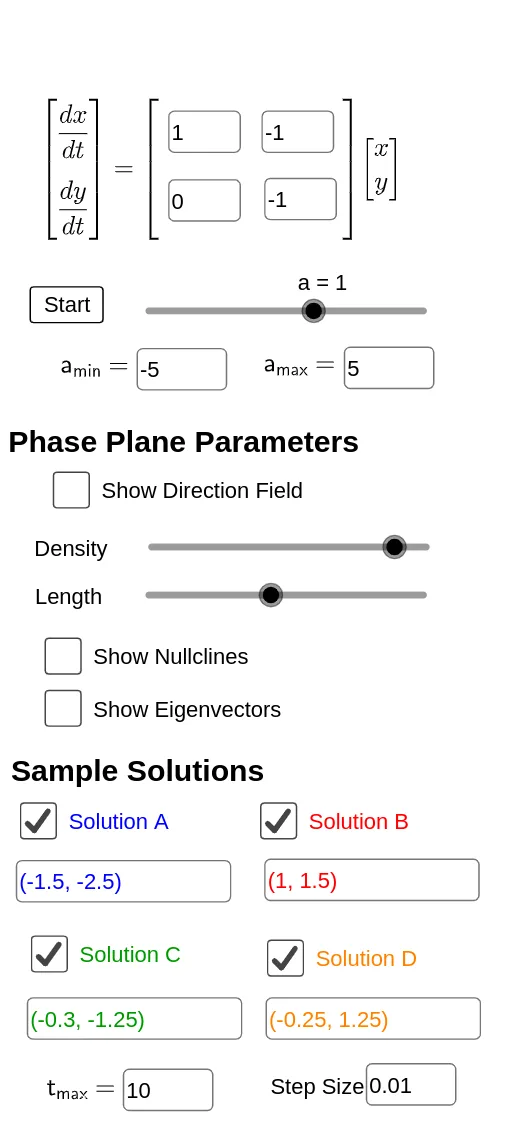
This example visualizes the phase portrait of a 2D linear dynamical system, showing how the flow patterns change with initial conditions and how eigenvectors determine the dominant directions of trajectories. It centers on core ideas from differential equations and linear algebra: solving a system of first-order ODEs, computing eigenvalues/eigenvectors of the system matrix, interpreting the phase plane (phase diagram), and comparing direction fields (slope fields) with representative solution trajectories. The construction uses GeoGebra commands such as SolveODE to compute the ODE solutions, SlopeField to generate the vector-direction field, and ImplicitCurve to display trajectory curves defined implicitly from conditions. Interface and workflow are assembled with InputBox, Textfield, and Corner, while If is used to control conditional logic for which objects are displayed. Geometric and annotation elements are built with Line and text objects, and the key data structures include the system matrix (Amat) and computed eigenvector information (evec), along with additional parameters used for numerical integrations (e.g., numericalIntegral*). Suitable for high-school advanced tracks through undergraduate courses on ODEs and linear algebra, especially for teaching eigenvector-based qualitative behavior and computer-assisted verification of phase portraits.
GeoGebra Commands & Parameters
Corner(2, 1) → ECorner(2, 3) → FTextfield(delta) → InputBox6SolveODE(g(x, y) / f(x, y), x(A), y(A), tmax, delta) → numericalIntegral1Textfield(tmax) → InputBox8SolveODE(g(x, y) / f(x, y), x(B), y(B), tmax, delta) → numericalIntegral3SolveODE(g(x, y) / f(x, y), x(C), y(C), tmax, delta) → numericalIntegral5SolveODE(g(x, y) / f(x, y), x(D), y(D), tmax, delta) → numericalIntegral7SlopeField(g(x, y) / f(x, y), n + 1, L, xmin, ymin, xmax, ymax) → slopefield1ImplicitCurve(f(x, y)) → fnullclineImplicitCurve(g(x, y)) → gnullclineIf(sgn(Element[eval, 1]) > 0, Vector[(0, 0), (Element[evec, 1, 1], Element[evec, 2, 1])], Vector[(Element[evec, 1, 1], Element[evec, 2, 1]), (0, 0)]) → uIf(sgn(Element[eval, 2]) > 0, Vector[(0, 0), (Element[evec, 1, 2], Element[evec, 2, 2])], Vector[(Element[evec, 1, 2], Element[evec, 2, 2]), (0, 0)]) → vLine((0, 0), (Element[evec, 1, 1], Element[evec, 2, 1])) → hLine((0, 0), (Element[evec, 1, 2], Element[evec, 2, 2])) → iTextfield(amin) → InputBox2Textfield(amax) → InputBox3Textfield(a11) → InputBox_a11Textfield(a12) → InputBox_a12Textfield(a21) → InputBox_a21Textfield(a22) → InputBox_a22Textfield(A) → InputBoxATextfield(B) → InputBoxBTextfield(C) → InputBox1Textfield(D) → InputBoxD
AI Drawing Prompt Reference
Visualize the phase portrait of a 2D linear dynamical system, showing flow patterns with different initial conditions and dominant trajectory directions determined by eigenvectors. Include a vector field representing slope directions, implicit curves for trajectories, and arrows indicating eigenvector directions based on eigenvalue signs. Start with the vector field, then add trajectory curves, and finally mark eigenvector directions with arrows for clear system behavior representation.
The prompt above was compiled from the original drawing commands and is for reference only.