
Curve Sketching: Dynamic Exploration of Functions and Geometry
Loading the math board and drawing, please wait…
In collections
数式処理(CAS) を学ぶ
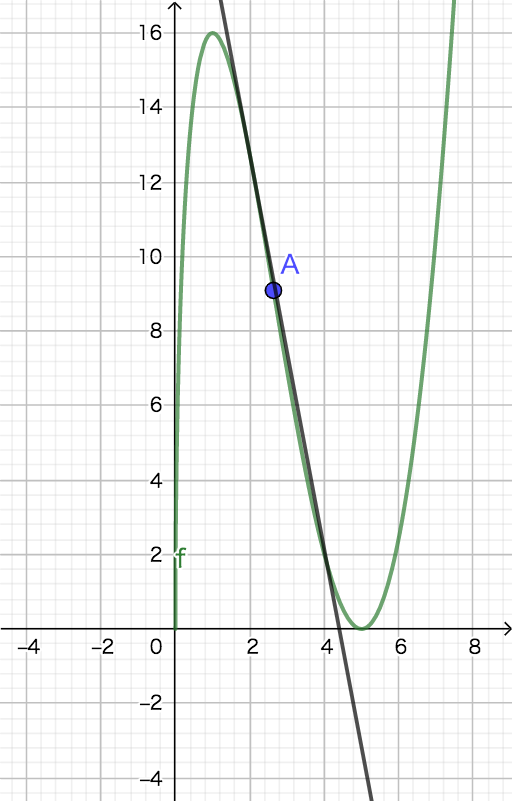
① This example demonstrates how to interactively sketch and explore a curve using GeoGebra, combining function graphs, point sets, and geometric objects to visualize how the curve's shape changes with parameters. ② Core mathematical concepts include functions, difference quotient and slope (Differenzenquotient und Steigung), integrals, and scatter plots (Streudiagramm), providing visual insights into derivatives and integration in calculus. ③ Construction highlights: from the construction summary, multiple objects (f, l1, a, b, A) and a series of named objects (e.g., ¥¦§¨©ª and variants) are used, likely with sliders or input boxes to control parameters, employing GeoGebra commands to generate function curves, point lists, and auxiliary geometric elements for dynamic adjustment and real-time feedback. ④ Suitable for high school to early college students, this is ideal for introductory calculus, function analysis, or math lab activities, helping learners understand the relationship between slope, area, and curve shape, and serving as a teacher demonstration tool.
GeoGebra Commands & Parameters
(sqrt(x) * (x^(2) - (10 * x) + 25))Solve(f = 0)Solve(f'(x) = 0)f''(1)f''(5)f({1, 5})Solutions(f''(x) = 0)Element(l1, 2)f(a)(a, b)Solve(f'(x) = tan(30°))Tangent(2, f)
AI Drawing Prompt Reference
Draw a graph of the function curve f(x) = sqrt(x) * (x^2 - 10x + 25) to show how its shape changes. Include the function curve, points where the derivative is zero, and a tangent line to visualize the relationship between slope, area, and curve shape. Construct by first drawing the function curve, then adding derivative zero points and a tangent line, and labeling key points to observe dynamic changes.
The prompt above was compiled from the original drawing commands and is for reference only.