
Slope Calculation Quiz
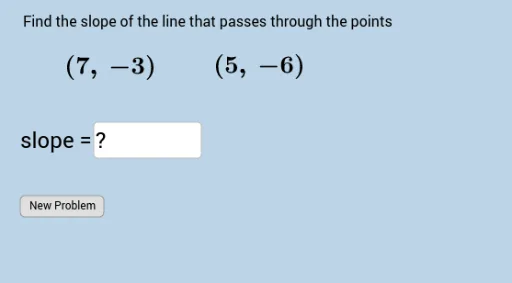
Loading the math board and drawing, please wait…
In collections
COORDINATE GEOMETRY
This example demonstrates how to draw a line through two points and calculate its slope, involving core math concepts like the slope formula, point-slope equation, and coordinate geometry. It uses GeoGebra commands and objects such as Sequence, RandomElement, Union, FractionText, Textfield, and elements like ylist, xlist, a, xlist2, xlist1, list1, c, b, d, e, text1, text2, text5, f, InputBox1, button1, text3, text4, text6. Suitable for high school students to practice and understand slope calculation methods.
GeoGebra Commands & Parameters
Sequence(i, i, -10, 10, 1) → ylistSequence(i, i, -10, 10, 1) → xlistRandomElement(xlist) → aSequence(i, i, a + 1, 10, 1) → xlist2Sequence(i, i, -10, a - 1, 1) → xlist1Union(xlist1, xlist2) → list1RandomElement(list1) → cRandomElement(ylist) → bRandomElement(ylist) → dFractionText(e) → text1Textfield(f) → InputBox1
AI Drawing Prompt Reference
Draw a line passing through points (a, b) and (c, d) and calculate its slope. First, randomly select two points a and c on the x-axis, and two points b and d on the y-axis. Then, draw a line through points (a, b) and (c, d) and display the slope as a fraction.
The prompt above was compiled from the original drawing commands and is for reference only.