
Slicing a Cylinder in Rotation to Get a Sine Function
Loading the math board and drawing, please wait…
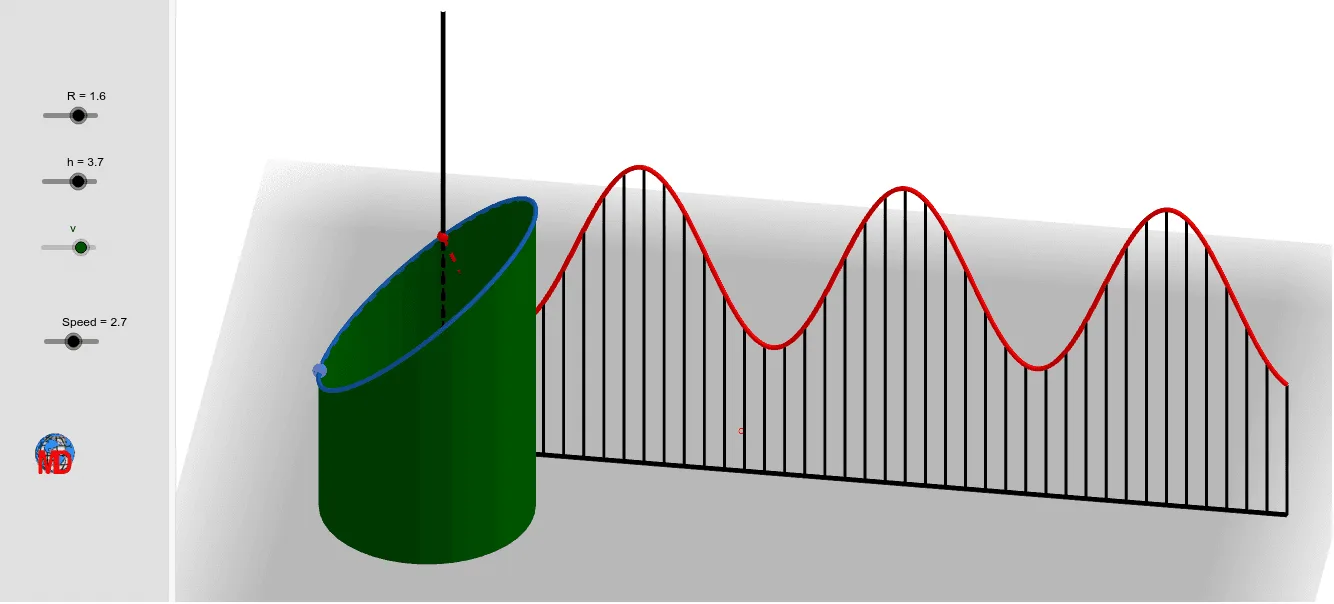
This example demonstrates the process of slicing a cylinder in rotation to obtain a sine function. Key mathematical concepts include rotation, sine function, and quadrilaterals. It is constructed using GeoGebra commands such as Line, Rotate, Segment, Circle, Cylinder, etc. Suitable for high school mathematics education and learning.
GeoGebra Commands & Parameters
Line(O, zAxis) → fRotate(C, v, f) → C'Rotate(E, v, f) → E'Rotate(A, v, f) → A'Segment(E', A') → lPoint(l) → FCircle(O, R, f) → cCylinder(c, h) → a, d, bCylinder(c, h + 2) → e, g, iSegment(E, A) → jPlane(B, C', F) → pIntersectPath(p, e) → kLine(H, xAxis) → mLine(G, H) → nIntersect(n, k) → I,Line(G, m) → qPoint(q) → JPlane(H, G, J) → rLine(F, B) → sIntersect(s, k) → K, LMirror(F, f) → F'Distance(F', K) → AmpSequence((x(O) + (R * cos(i)), y(O) + (R * sin(i)), z(O)), i, 0, (2 * π), (2 * π / n1)) → l1Sequence((x(O) + (R * cos(i)), y(O) + (R * sin(i)), z(O) + h + 3), i, 0, (2 * π), (2 * π / n1)) → l2Sequence(Segment[Element[l1, i], Element[l2, i]], i, 1, Length[l2]) → l3Sequence(Intersect[p, Element[l3, i]], i, 1, Length[l3]) → l4Sequence(Polygon[Element[l1, i], Element[l1, i + 1], Element[l4, i + 1], Element[l4, i]], i, 1, Length[l1]) → l5CurveCartesian(x(H) + i, y(H), z(H) + (Amp / 2 * cos((R * i) - v)), i, 0, (4 * π)) → oCurveCartesian(x(H) + i, y(H), z(H) - (Amp / 2 * cos((R * i) - v)), i, 0, (4 * π)) → tPoint(m) → MPoint(m) → NSegment(N, M) → f_1Point(n) → PIntersect(n, xOyPlane) → QSegment(P, Q) → g_1Sequence((x(H) + i, y(H), z(H) + (Amp / 2 * cos((R * i) - v))), i, 0, (4 * π), (4 * π / n1)) → l6Sequence((x(G) + i, y(G), z(G)), i, 0, (4 * π), (4 * π / n1)) → l7Sequence(Segment[Element[l6, i], Element[l7, i]], i, 1, Length[l7]) → l8Sequence(Segment[Element[l7, i], Element[l7, i + 1]], i, 1, Length[l7]) → l9Sequence((x(H) + i, y(H), z(H) - (Amp / 2 * cos((R * i) - v))), i, 0, (4 * π), (4 * π / n1)) → l10Sequence(Segment[Element[l10, i], Element[l7, i]], i, 1, Length[l7]) → l11
AI Drawing Prompt Reference
Draw a rotating cylinder and demonstrate how slicing it can produce a sine function. First, create a cylinder, then rotate and slice it to observe how the intersection forms a sine wave. Focus on the rotation process and the resulting cross-sectional shape to emphasize the formation of the sine function.
The prompt above was compiled from the original drawing commands and is for reference only.