
Slices of a Tetrahedron
Loading the math board and drawing, please wait…
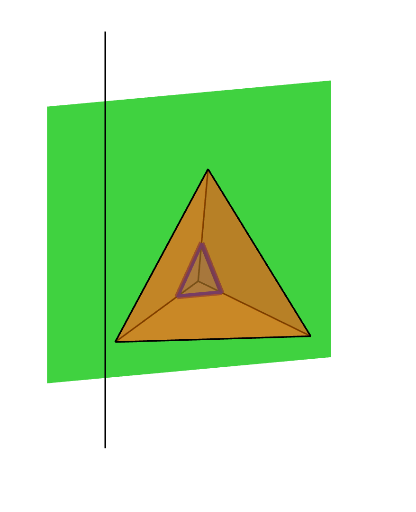
This example demonstrates the cross-sections of a tetrahedron. It involves the concept of cross-sections in solid geometry. Using GeoGebra commands such as Point, Tetrahedron, Rotate, IntersectPath, Line, etc., the various faces and edges of the tetrahedron can be constructed. Suitable for high school solid geometry education.
GeoGebra Commands & Parameters
Point(Circle[Midpoint[(1, 0, 0), Rotate[(1, 0, 0), (2 * π / 3)]], (Distance[(1, 0, 0), Rotate[(1, 0, 0), (2 * π / 3)]] * sqrt(3) / 2), Segment[(1, 0, 0), Rotate[(1, 0, 0), (2 * π / 3)]]]) → ATetrahedron((1, 0, 0), Rotate[(1, 0, 0), (2 * π / 3)], A) → a, B, edgeAB, edge5, face1, face3, face2, face4, edge2, edge1, edge4, edge3Rotate(Plane[(-1, 0, 0), (-1, 1, 0), (-1, 0, 1)], n, Line[(-1, 0, 0), (-1, 0, 1)]) → pIntersectPath(p, a) → poly1, C, D, E, f, g, hLine((-1, 0, 0), (-1, 0, 1)) → i
AI Drawing Prompt Reference
Draw a cross-section of a tetrahedron. Construct a tetrahedron with vertices at (1,0,0) and a rotated point. Draw the faces and edges of the tetrahedron. Then, intersect a plane with the tetrahedron to get a polygonal cross-section. Ensure the drawing is clear and shows the geometric structure of the tetrahedron.
The prompt above was compiled from the original drawing commands and is for reference only.