
Skeletal Cuboctahedron Animation
Loading the math board and drawing, please wait…
In collections
Action Modular Origami
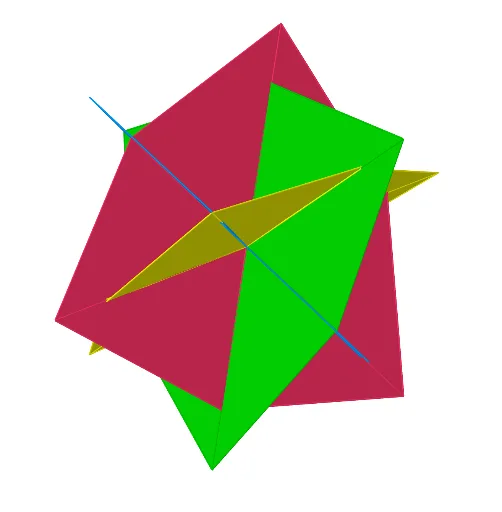
This example demonstrates the construction of a skeletal cuboctahedron model folded from paper, consisting of 12 units, inspired by the book 'Action Modular Origami' published by Tarquin. The animation shows the step-by-step folding process of the model. Key mathematical concepts involved include solid geometry, polygon construction, and spatial transformations. The construction utilizes GeoGebra commands and objects such as Line, OrthogonalPlane, Vector, Plane, Rotate, Translate, Midpoint, Dilate, Polygon, OrthogonalLine, Intersect, Angle, and Mirror. It is suitable for high school and above students studying solid geometry, spatial geometry transformations, and for mathematical modeling and geometric construction purposes.
GeoGebra Commands & Parameters
Line(A, B) → lxOrthogonalPlane(B, lx) → xxVector(B, A) → uPlane(A, B, Bkeep) → zzRotate(A, (-(90°)), B, zz) → CTranslate(C, u) → DRotate(B, (-(90°)), C, xx) → GTranslate(G, u) → HRotate(C, 90°, B, xx) → FTranslate(F, u) → EMidpoint(C, G) → CGMidpoint(H, G) → GHMidpoint(F, G) → FGMidpoint(A, B) → ABMidpoint(A, E) → AEMidpoint(A, D) → ADMidpoint(B, F) → BFMidpoint(A, G) → ODilate(GH, b, O) → GH'Dilate(AD, b, O) → AD'Dilate(BF, b, O) → BF'Midpoint(D, H) → DHDilate(DH, b, O) → DH'Midpoint(E, H) → EHMidpoint(C, D) → CDMidpoint(B, C) → BCDilate(BC, b, O) → BC'Midpoint(E, F) → EFDilate(EF, b, O) → EF'Dilate(CD, b, O) → CD'Dilate(AE, b, O) → AE'Dilate(FG, b, O) → FG'Dilate(EH, b, O) → EH'Dilate(CG, b, O) → CG'Dilate(AB, b, O) → AB'Polygon(AE, BF, CG, DH) → poly1, i, j, k, lPolygon(AE', EF, FG', CG, CD', AD) → poly2, t, a_1, b_1, c_1, d_1, e_1Polygon(EH, EF', BF, BC', CD, DH') → poly4, f_1, g_1, h_1, i_1, j_1, k_1Polygon(GH', FG, BF', AB, AD', DH) → poly5, h, m, n, p, q, rPolygon(AB, EF, GH, CD) → poly1', i', j', k', l'Polygon(EH', GH, CG', BC, AB', AE) → poly3, c, d, e, f, g, sPolygon(AD, BC, FG, EH) → poly1'_1, i'_1, j'_1, k'_1, l'_1OrthogonalLine(A, zz) → lzPlane(A, B, F) → yyOrthogonalLine(A, yy) → l_1Line(O, lz) → lzzLine(O, lx) → lxxLine(O, l_1) → lyyRotate(GH, α, lzz) → GH'_1Rotate(FG, α, lzz) → FG'_1Rotate(EF, α, lzz) → EF'_1Rotate(EH, α, lzz) → EH'_1Polygon(GH', EH'_1, O) → poly6, o, gh', eh'_1Polygon(FG', GH'_1, O) → poly7, o_1, fg', gh'_1Polygon(EF', FG'_1, O) → poly8, o_2, ef', fg'_1Intersect(lyy, lzz) → IPolygon(EH', EF'_1, O) → poly9, o_3, eh', ef'_1Rotate(poly9, β, fg'_1) → poly9'Rotate(poly6, β, ef'_1) → poly6'Rotate(poly7, β, eh'_1) → poly7'Rotate(poly8, β, gh'_1) → poly8'Rotate(poly9, β, ef'_1) → poly9'_1Rotate(poly6, β, eh'_1) → poly6'_1Rotate(poly7, β, gh'_1) → poly7'_1Rotate(poly8, β, fg'_1) → poly8'_1Rotate(poly7, β, eh'_1) → poly7'_2Line(AE', CG') → aLine(DH', BF') → m_1Rotate(poly6', (-β), a) → poly6''Rotate(poly6'_1, β, a) → poly10Rotate(poly9'_1, β, m_1) → poly11Rotate(poly8', β, a) → poly8''Rotate(poly9', β, m_1) → poly9''OrthogonalLine(O, zz) → n_1Rotate(poly7', (-β), m_1) → poly7''Rotate(poly7'_1, β, m_1) → poly12Rotate(poly8'_1, (-β), a) → poly13Line(O, CD') → p_1Line(O, EH') → q_1Rotate(poly9'', (-β), q_1) → poly9'''Line(O, GH') → r_1Rotate(poly6'', (-β), r_1) → poly6'''Rotate(poly12, (-β), r_1) → poly12'Line(AD', O) → s_1Rotate(poly13, (-β), s_1) → poly13'Angle(O, EF', FG'_1, poly8'_1) → γRotate(poly6, δ, lzz) → poly6'_2Mirror(poly6', lzz) → poly6''_1Rotate(poly6', δ, lzz) → poly6''_2Rotate(poly6'', δ, lzz) → poly6'''_1Rotate(poly6'_1, δ, lzz) → poly14Rotate(poly10, δ, lzz) → poly10'Rotate(poly6''', δ, lzz) → poly15Rotate(poly9'_1, δ, lzz) → poly16Rotate(poly9, δ, lzz) → poly9'_2Rotate(poly9', δ, lzz) → poly9''_1Rotate(poly9'', δ, lzz) → poly9'''_1Rotate(poly9''', δ, lzz) → poly17Rotate(poly11, δ, lzz) → poly11'Rotate(poly7'_1, δ, lzz) → poly18Rotate(poly7, δ, lzz) → poly7'_3Rotate(poly7', δ, lzz) → poly7''_1Rotate(poly7'', δ, lzz) → poly7'''Rotate(poly12', δ, lzz) → poly12''Rotate(poly12, δ, lzz) → poly12'_1Rotate(poly8, δ, lzz) → poly8'_2Rotate(poly8'_1, δ, lzz) → poly19Rotate(poly13, δ, lzz) → poly13'_1Rotate(poly13', δ, lzz) → poly13''Rotate(poly8'', δ, lzz) → poly8'''Rotate(poly8', δ, lzz) → poly8''_1
AI Drawing Prompt Reference
Draw an animated skeletal cuboctahedron model folded from paper, showing the step-by-step folding process. The model consists of 12 units inspired by 'Action Modular Origami'. Start by drawing two line segments and their orthogonal planes, then use vectors and rotations to construct key points, followed by translations and reflections to generate midpoints. Finally, connect these points to form multiple polygons, creating a skeletal structure that demonstrates dynamic transformations.
The prompt above was compiled from the original drawing commands and is for reference only.