
Sine Rule - Find an Angle
Loading the math board and drawing, please wait…
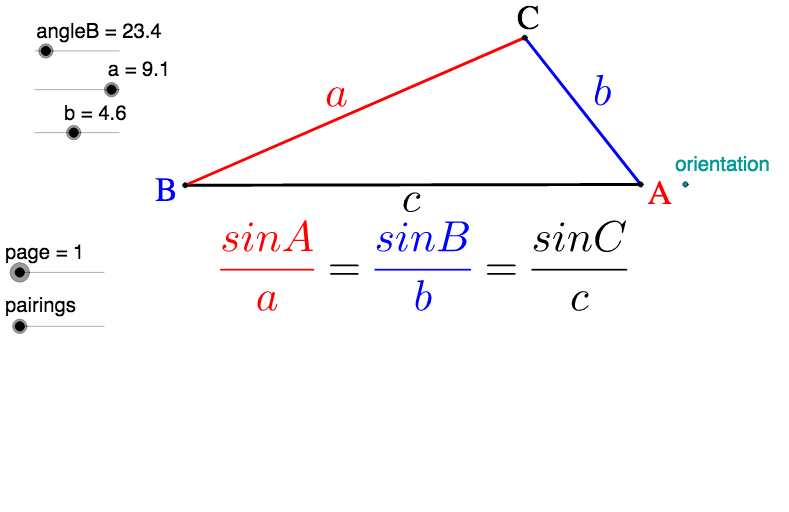
This example demonstrates how to use the Sine Rule to find an unknown angle in a triangle. Key math concepts include the Sine Rule and its application. GeoGebra commands and objects used in the construction are Line, Rotate, Circle, Intersect, Segment, Angle, Midpoint, If, and Vector. Suitable for high school students learning trigonometry and geometric constructions.
GeoGebra Commands & Parameters
Line(R, orientation) → b_1Rotate(orientation, angleB°, R) → U'_1Line(R, U'_1) → a_1Circle(R, a) → c_1Intersect(c_1, a_1) → Z_1, PCircle(P, b) → d_1Intersect(d_1, b_1) → V_1, QSegment(P, Q) → b_2Segment(R, Q) → cSegment(R, P) → a_2Angle(Q, P, R) → γAngle(R, Q, P) → αAngle(P, R, Q) → βMidpoint(a_2) → A'Midpoint(c) → C'Midpoint(b_2) → B'Midpoint(C', Q) → DMidpoint(B', Q) → EMidpoint(D, E) → FIf(sin(α) < 0, "-", "") → signsinAAngle(orientation, R, U'_1) → α_2Segment(P, Q) → e_1Circle(P, R) → f_1Intersect(f_1, b_1) → W_1, W'_1Segment(P, W'_1) → g_1Vector(Q, A') → uVector(R, B') → vVector(P, C') → wSegment(V_1, P) → iSegment(R, V_1) → lAngle(P, V_1, R) → δMidpoint(R, A') → AMidpoint(R, C') → BMidpoint(A, B) → C
AI Drawing Prompt Reference
Draw a triangle with two known sides and the included angle, then use the sine rule to find the third side and the unknown angle. Start by drawing the known sides and angle, then draw a circle with one side as the diameter and connect the intersection points to form the third side. Label all sides and angles, find midpoints of each side, and draw angle bisectors to locate intersection points. Finally, represent each side direction with vectors.
The prompt above was compiled from the original drawing commands and is for reference only.