
Sine, Cosine, Tangent 0°–360°: Unit Circle and Function Graphs
Loading the math board and drawing, please wait…
In collections
Sine and Cosine Functions
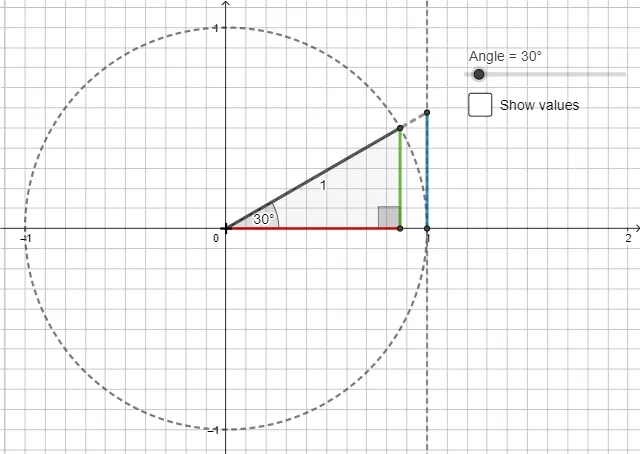
①This example demonstrates the behavior of sine, cosine, and tangent functions over the range 0° to 360° (0 to 2π radians) using a dynamic unit circle and an angle slider, linking numerical values to geometric visualization. ②Core mathematical concepts include the unit-circle definitions of trigonometric functions, periodicity, parity, and the asymptotic nature of the tangent function, along with angle–radian conversion. ③Construction highlights: using GeoGebra commands such as Polygon, If, Intersect, and Segment to build the unit circle, angle rays, perpendicular segments, and intersection points; a slider β controls the angle, while objects c, Angle, A, B, O, t1, a, b, o, β, f, D, g, γ, C, h, i, e, h1, a1, o1 and text labels text1, text2, text3 display the function values dynamically. ④Suitable for high-school trigonometry lessons on function graphs and properties, as well as pre-calculus review, helping students grasp the geometric meaning of trigonometric functions and their graphical relationships.
GeoGebra Commands & Parameters
Polygon(B, O, A) → t1, a, b, oIf(0 ≤ Angle ≤ 90°, Angle[A, B, O], If[90° < Angle ≤ 180°, Angle[O, B, A], If[180° < Angle ≤ 270°, Angle[A, B, O], Angle[O, B, A]]]) → βIntersect(c, f, 1) → DIf(0 ≤ Angle ≤ 90°, Ray[O, A], If[90° < Angle ≤ 270°, Ray[A, O], Ray[O, A]]) → gIf(0 ≤ Angle ≤ 90°, Angle[D, O, A], If[90° < Angle < 180°, Angle[D, O, A], If[180° ≤ Angle < 270°, Angle[D, O, A], Angle[D, O, A]]]) → γIntersect(f, g) → CSegment(D, C) → hSegment(O, C) → i