
Improved Unit Circle Demo: Visualizing Trigonometric Functions
Loading the math board and drawing, please wait…
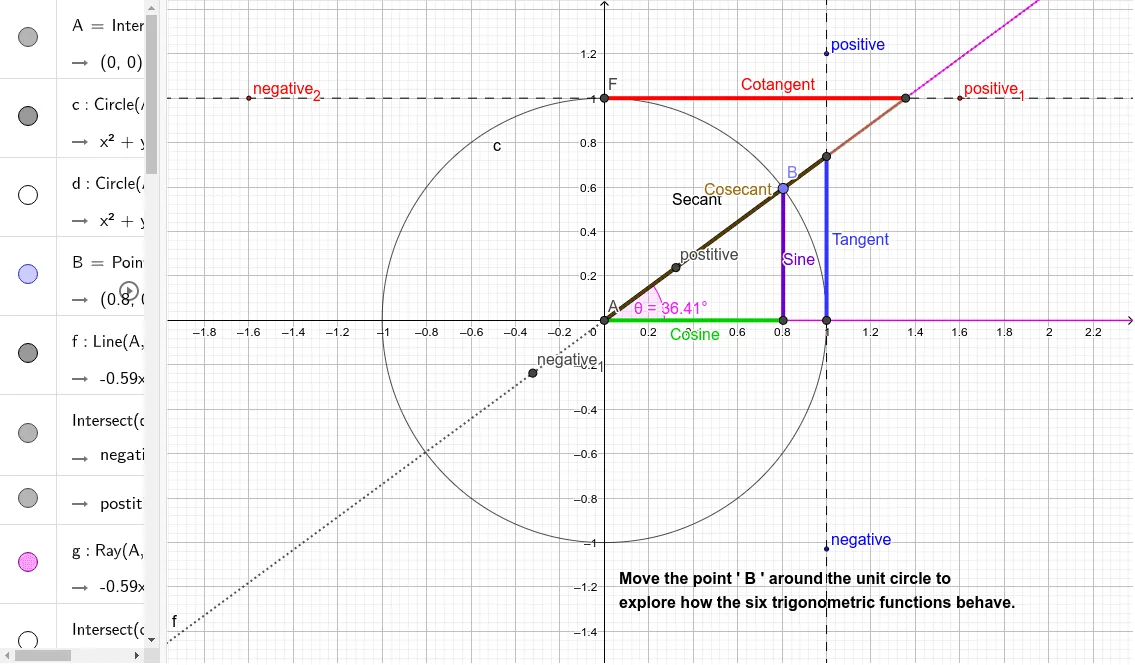
① This interactive GeoGebra example demonstrates the geometric representation of all six trigonometric functions (sine, cosine, tangent, cotangent, secant, cosecant) on the unit circle, showing how their values change as the angle varies. ② Core mathematical concepts include the unit circle definition of trigonometric functions, trigonometric line segments (sine line, cosine line, tangent line, etc.), angle measurement in degrees/radians, and periodicity. ③ Construction highlights: using GeoGebra commands such as Intersect, Circle, Point, Line, Ray, Angle, OrthogonalLine, and Segment to build the unit circle, radius, perpendiculars, tangents, and angle markers; key objects include center A, circle c, moving point C, angle θ, sine/cosine segments, tangent/cotangent/secant/cosecant segments, and positive/negative labels; the dynamic behavior is driven by dragging point C or using a slider. ④ Suitable for high school and introductory college students learning trigonometric definitions and graphs, as well as for teachers demonstrating the relationship between angles and trigonometric functions in classroom settings.
GeoGebra Commands & Parameters
Intersect(xAxis, yAxis) → ACircle(A, 1) → cCircle(A, 2) → dPoint(c) → CLine(A, C) → fIntersect(d, f) → negative_{1}, postitiveRay(A, C) → gIntersect(c, xAxis) → C_{1}, DAngle(D, A, C) → θRay(A, D) → hOrthogonalLine(D, h) → iIntersect(c, yAxis) → E_{1}, FOrthogonalLine(F, yAxis) → jOrthogonalLine(C, h) → kIntersect(k, xAxis) → BSegment(C, B) → SineSegment(A, B) → CosineIntersect(i, f) → EIntersect(j, f) → ISegment(D, E) → TangentSegment(F, I) → CotangentSegment(A, E) → SecantSegment(A, I) → CosecantPoint(j) → negative_{2}Point(j) → positive_{1}Point(i) → positivePoint(i) → negative
AI Drawing Prompt Reference
Draw a unit circle centered at the origin with radius 1. Place a movable point C on the circle and draw a line segment f from A to C. Take point D on the circle and draw a line segment h from A to D, then draw a perpendicular line segment i from D. Draw a perpendicular line segment k from C, intersecting the x-axis at point B. Draw a line segment from C to B to represent sine, and from A to B to represent cosine. Draw a line segment from D to the intersection E of i and f to represent tangent, and from F to the intersection I of j and f to represent cotangent. Draw a line segment from A to E to represent secant, and from A to I to represent cosecant. Take point F on the y-axis and draw a perpendicular line segment j from F, intersecting the x-axis at negative and positive points to indicate negative and positive values.
The prompt above was compiled from the original drawing commands and is for reference only.