
sin(75) & cos(75) activity
Loading the math board and drawing, please wait…
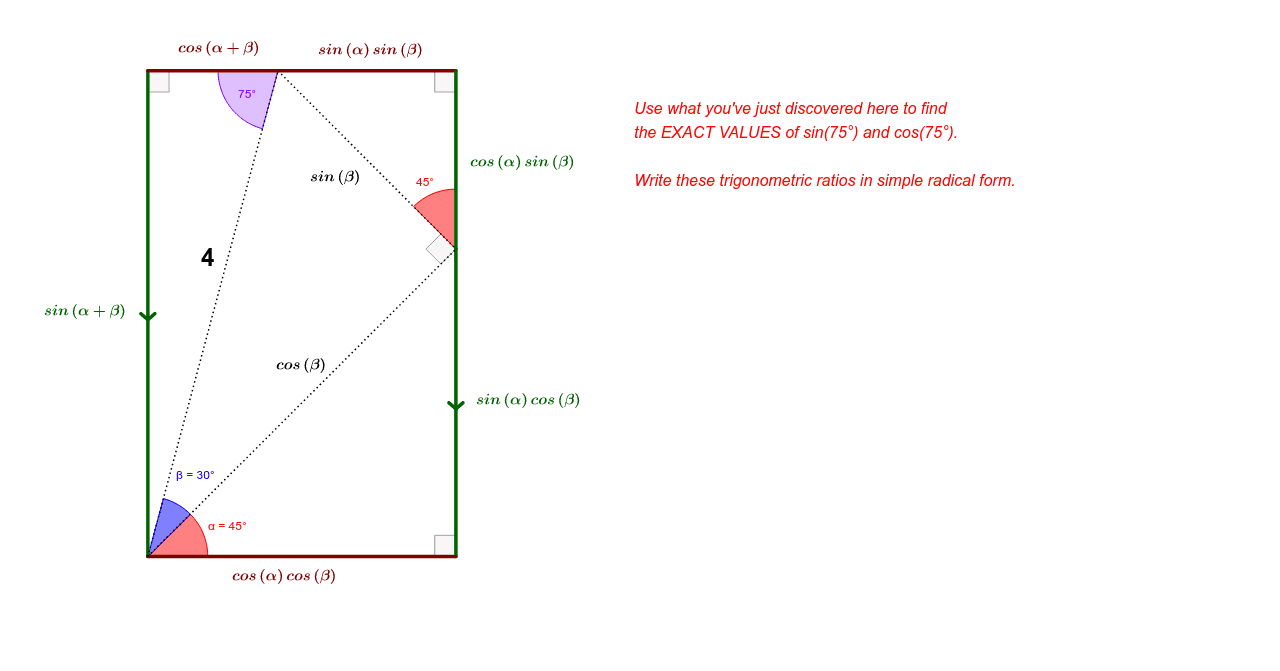
This example demonstrates how to construct geometric figures to understand the values of sin(75) and cos(75). Core math concepts include trigonometric functions, angle calculations, and geometric constructions. Construction highlights involve commands like Ray, Intersect, OrthogonalLine, Point, Line, Segment, Angle, Rotate, and objects A, B, C, etc. Suitable for high school mathematics teaching to help students visually grasp the calculation and application of trigonometric functions.
GeoGebra Commands & Parameters
Ray(A, C) → aRay(A, D) → cIntersect(a, b) → EOrthogonalLine(E, a) → dPoint(d) → FIntersect(d, c) → GLine(G, xAxis) → eIntersect(f, yAxis) → HIntersect(e, f) → IIntersect(b, e) → JSegment(G, E) → gSegment(I, G) → hSegment(G, J) → iSegment(J, E) → jSegment(E, B) → kSegment(I, A) → lSegment(A, E) → mSegment(A, G) → nIntersect(b, c) → MSegment(A, B) → qAngle(A, I, G) → ζRotate(B, 45*°, A) → B'Angle(B, A, B') → αRay(A, B') → pRotate(B', 30*°, A) → B''Angle(B', A, B'') → βRay(A, B'') → rIntersect(h, r) → KOrthogonalLine(K, m) → sIntersect(s, m) → LOrthogonalLine(L, q) → tIntersect(q, t) → NIntersect(t, h) → OIntersect(t, i) → PSegment(I, K) → a_1Segment(K, P) → b_1Segment(P, L) → c_1Segment(L, N) → d_1Segment(N, A) → e_1Segment(A, K) → f_1Segment(K, L) → g_1Angle(K, L, A) → α_1Angle(I, P, N) → β_1Angle(P, N, A) → γSegment(A, L) → h_1Angle(P, L, K) → δAngle(I, K, A) → ε
AI Drawing Prompt Reference
Draw a right triangle with angle A as the right angle, angle B as 45 degrees, and angle C as 30 degrees. Construct the geometric representation of sin(75) and cos(75) through rotations and intersections. Start by drawing two rays AB and AC, then construct angles B and C through rotations, and finally use intersections and rays to construct the triangle's sides and angles, illustrating the geometric meaning of trigonometric functions.
The prompt above was compiled from the original drawing commands and is for reference only.