
Simplifying Square Roots
Loading the math board and drawing, please wait…
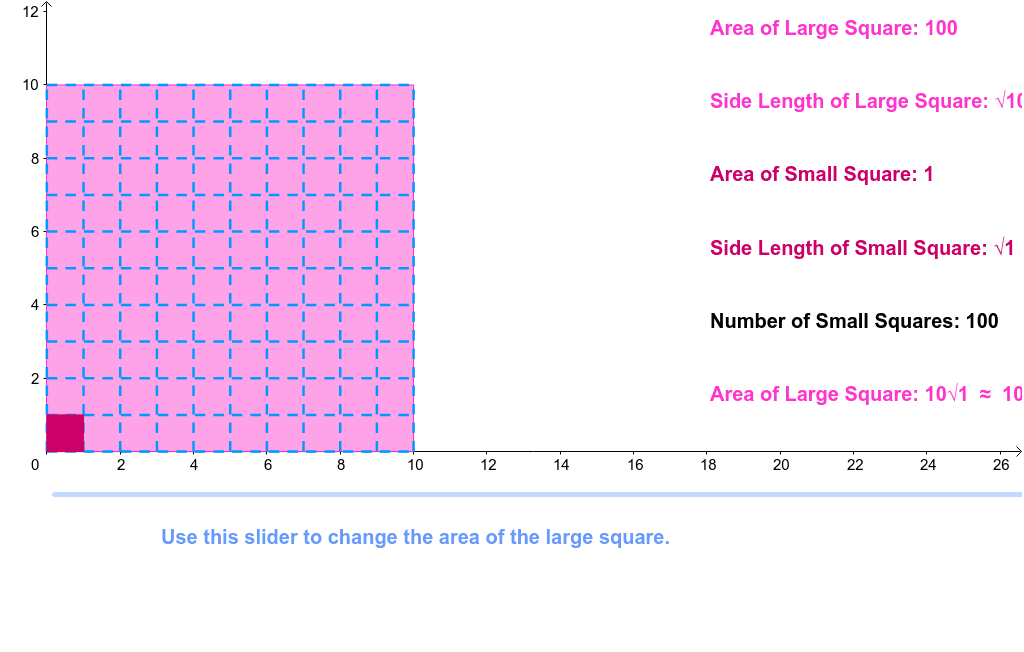
This example demonstrates how to simplify square roots using GeoGebra, visually showing the decomposition and simplification process. It involves core math concepts like square roots, factorization, sequences, and polygon construction. Key GeoGebra commands and objects used include Polygon, DivisorsList, Factors, Sequence, RemoveUndefined, Last, Element, dynamically illustrating factorization and simplification via sliders. Suitable for middle school and above learners to understand properties of square roots and applications of factorization.
GeoGebra Commands & Parameters
Polygon((0, 0), (a, 0), 4) → poly1DivisorsList(n) → list1Factors(n) →Sequence(sqrt(Element[list1, i]), i, 1, Length[list1]) → list2Sequence(Div[Element[list2, i], 1], i, 1, Length[list2]) → list3Sequence(If[Element[list2, i] ≟ Element[list3, i], Element[list3, i]], i, 1, Length[list3]) → list4RemoveUndefined(list4) → list5Last(list5) → list7Element(list7, 1) → ASequence(Segment[((sqrt(n) * i / A), 0), ((sqrt(n) * i / A), sqrt(n))], i, 0, A) → list6Sequence(Segment[(0, (sqrt(n) * i / A)), (sqrt(n), (sqrt(n) * i / A))], i, 0, A) → list8Polygon((0, 0), (sqrt(n) / A, 0), (sqrt(n) / A, sqrt(n) / A), (0, sqrt(n) / A)) → poly2, c, d, e, f
AI Drawing Prompt Reference
Draw a square with side length of sqrt(n), then draw a series of parallel line segments inside the square, with each segment's length being sqrt(n) divided by each element in the simplified square root list. Finally, draw a square using each element in the simplified square root list.
The prompt above was compiled from the original drawing commands and is for reference only.