
Exploring Translations on a Coordinate Grid by debbie.steffen
Loading the math board and drawing, please wait…
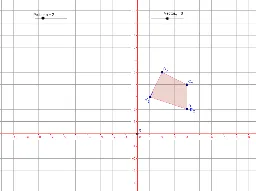
This example demonstrates geometric transformations, specifically translations of polygons on a coordinate grid. It involves core concepts like vectors, coordinate geometry, and transformations. Constructed using commands like Polygon, Vector, and Translate with objects such as vectors and polygons. Aimed at 8-10th grade students introducing geometry.
GeoGebra Commands & Parameters
Polygon(A, B, C, D) → poly1, a, b, c, dVector(E, F) → uTranslate(A_1, u) → GTranslate(B_1, u) → HTranslate(C_1, u) → ITranslate(D_1, u) → JVector(E, K) → vTranslate(A_1, v) → LTranslate(B_1, v) → MTranslate(C_1, v) → NTranslate(D_1, v) → OVector(E, P) → wTranslate(A_1, w) → QTranslate(B_1, w) → RTranslate(C_1, w) → STranslate(D_1, w) → TTranslate(A, u) → A'_1Translate(B, u) → B'_1Translate(C, u) → C'_1Translate(D, u) → D'_1Polygon(A'_1, B'_1, C'_1, D'_1) → poly1', a', b', c', d'Translate(A_1, u) → UTranslate(B_1, u) → VTranslate(C_1, u) → WTranslate(D_1, u) → ZPolygon(U, V, W, Z) → poly2, u_1, v_1, w_1, zTranslate(A, v) → A'_2Translate(B, v) → B'_2Translate(C, v) → C'_2Translate(D, v) → D'_2Polygon(A'_2, B'_2, C'_2, D'_2) → poly1'_1, a'_1, b'_1, c'_1, d'_1Translate(A_1, v) → E_1Translate(B_1, v) → F_1Translate(C_1, v) → G_1Translate(D_1, v) → H_1Polygon(E_1, F_1, G_1, H_1) → poly3, e_1, f_1, g_1, h_1Translate(A, w) → A'_3Translate(B, w) → B'_3Translate(C, w) → C'_3Translate(D, w) → D'_3Polygon(A'_3, B'_3, C'_3, D'_3) → poly1'_2, a'_2, b'_2, c'_2, d'_2Translate(A_1, w) → I_1Translate(B_1, w) → J_1Translate(C_1, w) → K_1Translate(D_1, w) → L_1Polygon(I_1, J_1, K_1, L_1) → poly4, i_1, j_1, k_1, l_1Translate(A'_3, Vector[(0, 0)]) → A''Polygon(A_4, B_4, C_4, D_4) → poly1_2, a_2, b_2, c_2, d_2Polygon(A_3, B_3, C_3, D_3) → poly1_3, a_3, b_3, c_3, d_3Polygon(A_5, B_5, C_5, D_5) → poly1_4, a_4, b_4, c_4, d_4Polygon(A_6, B_6, C_6, D_6) → poly1_5, a_5, b_5, c_5, d_5
AI Drawing Prompt Reference
Draw a quadrilateral on a coordinate grid and show its translated versions. First, draw the original quadrilateral. Then, use a vector to translate each vertex of the quadrilateral to create a translated quadrilateral. Next, show two translated versions: one using the first vector and another using the second vector. Finally, show the translated quadrilateral compared to the original quadrilateral.
The prompt above was compiled from the original drawing commands and is for reference only.