
Exploring Translations 4: Geometric Translation on a Coordinate Grid
Loading the math board and drawing, please wait…
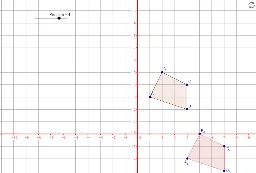
① This example demonstrates the geometric transformation of translation on a coordinate grid, showing how a polygon (triangle) moves along a vector while preserving its shape and size. ② Core math concepts include translation, vectors, coordinate geometry, and congruence; by dragging vectors or vertices, students can observe how direction and distance affect the translated image. ③ Construction highlights: using GeoGebra commands Polygon, Vector, and Translate; objects include multiple points (A, B, C, D, etc.), vectors (Vector_3y, Vector_3x, u, v, w), and translated vertices (A'_1, B'_1, C'_1, D'_1); parametric curves and logic tree diagrams may appear as extensions. ④ Suitable for grades 8-10 introductory geometry, this interactive tool helps students grasp translation properties, vector representation, and coordinate-grid operations, and can be used for dynamic exploration or classroom demonstration.
GeoGebra Commands & Parameters
Polygon(A, B, C, D) → poly1, a, b, c, dVector(E, F) → uTranslate(A_1, u) → GTranslate(B_1, u) → HTranslate(C_1, u) → ITranslate(D_1, u) → JVector(E, K) → vTranslate(A_1, v) → LTranslate(B_1, v) → MTranslate(C_1, v) → NTranslate(D_1, v) → OVector(E, P) → wTranslate(A_1, w) → QTranslate(B_1, w) → RTranslate(C_1, w) → STranslate(D_1, w) → TTranslate(A, u) → A'_1Translate(B, u) → B'_1Translate(C, u) → C'_1Translate(D, u) → D'_1Polygon(A'_1, B'_1, C'_1, D'_1) → poly1', a', b', c', d'Translate(A_1, u) → UTranslate(B_1, u) → VTranslate(C_1, u) → WTranslate(D_1, u) → ZPolygon(U, V, W, Z) → poly2, u_1, v_1, w_1, zTranslate(A, v) → A'_2Translate(B, v) → B'_2Translate(C, v) → C'_2Translate(D, v) → D'_2Polygon(A'_2, B'_2, C'_2, D'_2) → poly1'_1, a'_1, b'_1, c'_1, d'_1Translate(A_1, v) → E_1Translate(B_1, v) → F_1Translate(C_1, v) → G_1Translate(D_1, v) → H_1Polygon(E_1, F_1, G_1, H_1) → poly3, e_1, f_1, g_1, h_1Translate(A, w) → A'_3Translate(B, w) → B'_3Translate(C, w) → C'_3Translate(D, w) → D'_3Polygon(A'_3, B'_3, C'_3, D'_3) → poly1'_2, a'_2, b'_2, c'_2, d'_2Translate(A_1, w) → I_1Translate(B_1, w) → J_1Translate(C_1, w) → K_1Translate(D_1, w) → L_1Polygon(I_1, J_1, K_1, L_1) → poly4, i_1, j_1, k_1, l_1Translate(A'_3, Vector[(0, 0)]) → A''Polygon(A_4, B_4, C_4, D_4) → poly1_2, a_2, b_2, c_2, d_2Polygon(A_3, B_3, C_3, D_3) → poly1_3, a_3, b_3, c_3, d_3Polygon(A_5, B_5, C_5, D_5) → poly1_4, a_4, b_4, c_4, d_4Polygon(A_6, B_6, C_6, D_6) → poly1_5, a_5, b_5, c_5, d_5
AI Drawing Prompt Reference
Draw a coordinate grid with a quadrilateral as the original shape, marking its four vertices. From a common starting point, create three distinct vectors with different directions and lengths, each shown in a different color or style. Translate the original quadrilateral along each of these three vectors to produce three translated copies, each identical in shape and size to the original, with corresponding vertices connected by dashed lines to indicate the translation paths. Additionally, show a double translation where the original quadrilateral is first moved along one vector and then along another, resulting in a final position after two successive translations. Keep all shapes clear, with visible axes and grid lines to observe the direction and distance of each translation.
The prompt above was compiled from the original drawing commands and is for reference only.