
Simplifying Radicals
Loading the math board and drawing, please wait…
In collections
Regular Polygons
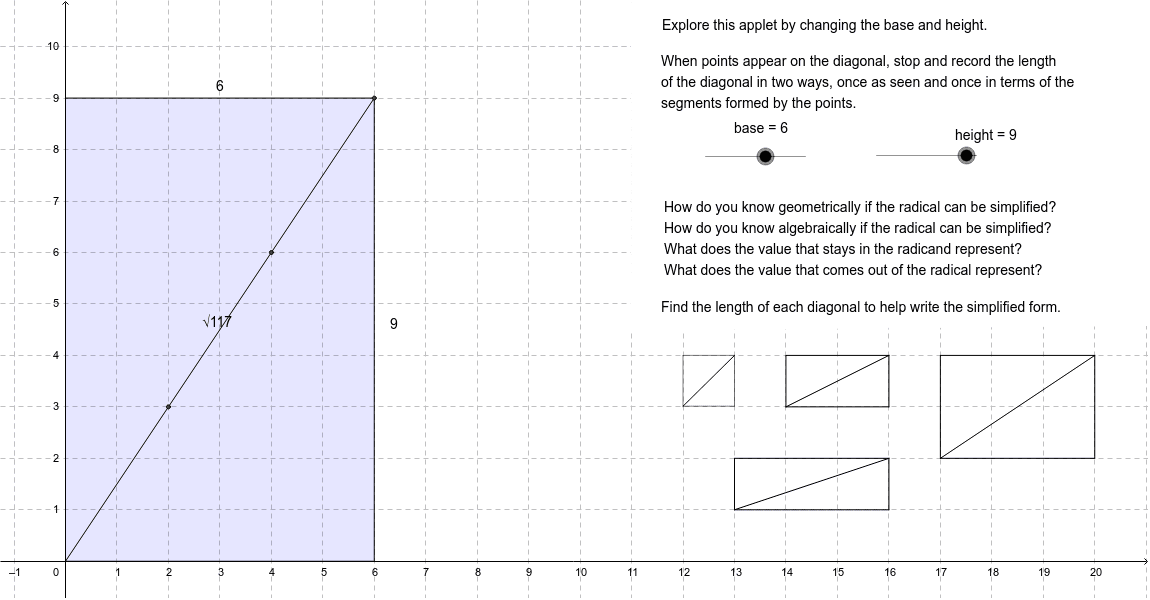
This example demonstrates how radicals can be simplified when points appear on the diagonal. It involves core math concepts like radical simplification, geometric construction, and analytical geometry. GeoGebra commands/objects used include Intersect, Circle, OrthogonalLine, Polygon, Segment, Midpoint, and Point. Suitable for high school students and teachers to understand the relationship between radical simplification and geometric figures.
GeoGebra Commands & Parameters
Intersect(xAxis, yAxis) → ACircle(A, height) → cCircle(A, base) → dOrthogonalLine(A, xAxis) → eOrthogonalLine(A, e) → fIntersect(d, f, 1) → BOrthogonalLine(B, f) → gCircle(B, height) → hIntersect(h, g) → C, DOrthogonalLine(C, g) → iIntersect(c, i) → E,Polygon(A, B, C, E) → poly1, a_1, b_1, c_1, e_1Segment(A, C) → jMidpoint(j) → FIntersect(a, j) → KIntersect(b, j) → LIntersect(j, k) → MIntersect(l, j) → NIntersect(j, m) → OIntersect(n, j) → PIntersect(p, j) → QIntersect(q, j) → RIntersect(r, j) → SPolygon(T, U, V, W) → poly2, t_1, u, v, wPolygon(Z, A_1, B_1, C_1) → poly3, z, a_2, b_2, c_2Polygon(D_1, E_1, F_1, G_1) → poly4, d_1, e_2, f_1, g_1Polygon(H_1, I_1, J_1, K_1) → poly5, h_1, i_1, j_1, k_1Point(xAxis) → N_1Polygon(O_1, P_1, Q_1, R_1) → poly6, o_1, p_1, q_1, r_1Intersect(c_2, z) → S_1Intersect(b_2, a_2) → T_1Segment(S_1, T_1) → l_1Intersect(g_1, f_1) → U_1Intersect(e_2, d_1) → V_1Segment(U_1, V_1) → m_1Intersect(i_1, h_1) → W_1Intersect(k_1, j_1) → Z_1Segment(W_1, Z_1) → n_1Intersect(p_1, o_1) → A_2Point(r_1) → B_2Segment(A_2, B_2) → s_1
AI Drawing Prompt Reference
Draw a coordinate system with two perpendicular lines as axes. Create two circles centered at the origin with different radii, intersecting the axes. Draw tangents from the origin to these circles, and connect the intersection points to form a quadrilateral. Then, find the midpoints of the diagonals and connect them to the vertices, creating smaller quadrilaterals and triangles. Finally, connect some vertices to form pentagons and hexagons.
The prompt above was compiled from the original drawing commands and is for reference only.