
Simple Harmonic Motion - Ferris Wheel Visualization
Loading the math board and drawing, please wait…
In collections
Precal
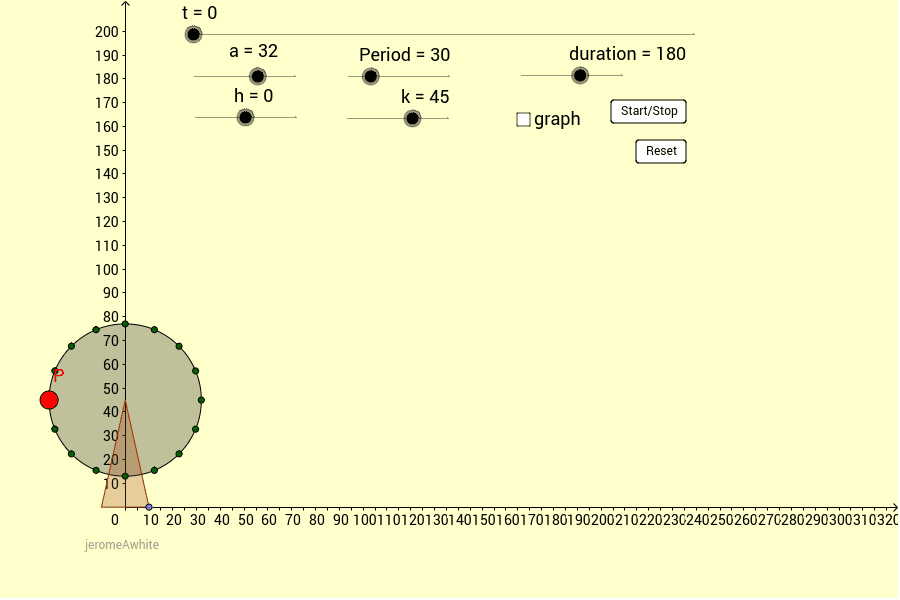
This GeoGebra example uses a rotating Ferris wheel to visually connect circular motion with simple harmonic motion (SHM) equations, making abstract trigonometric functions tangible. It demonstrates how the vertical or horizontal displacement of a point on the wheel follows a sine or cosine wave over time. Core mathematical concepts include sine and cosine functions, angular frequency ω, phase shift, period, amplitude, and parametric equations for circular motion. The construction employs GeoGebra commands such as Point, Function, Mirror, Circle, Polygon, and Sequence to build the wheel and cabins, with sliders controlling time t and angular frequency ω. The cabin position is given by the parametric expression a(sin(ω(t-π/2)), cos(ω(t-π/2)))+(0,k), and corresponding sine/cosine graphs are plotted alongside. Buttons are added to start/pause the animation. This resource is ideal for high school trigonometry or precalculus classes, helping students grasp the relationship between uniform circular motion and SHM, and understand the geometric meaning of phase, period, and amplitude.
GeoGebra Commands & Parameters
Point(xAxis) → AFunction(a * sin(ω * (x - h)) + k, 0, duration) → j2Function(j2, 0, Period) → jPoint(xAxis) → DMirror(D, yAxis) → D'Circle(C, a) → ePolygon(D, C, D') → poly1, d', d_1, c_1Sequence((a * cos(π + increment * n - ω * (t - h)), k + a * sin(π + increment * n - ω * (t - h))), n, 1, chairs - 1, 1) → list1
AI Drawing Prompt Reference
Draw a rotating Ferris wheel with multiple cabins to visualize simple harmonic motion. The wheel rotates around a fixed center with a radius as the amplitude. Show the vertical and horizontal displacements of a point on the wheel over time as sine and cosine waves, with their amplitudes, periods, and phase shifts controlled by sliders. Include buttons to start and pause the animation, demonstrating how the point's motion matches the trigonometric functions.
The prompt above was compiled from the original drawing commands and is for reference only.