
Simple 3D Problems 2
Loading the math board and drawing, please wait…
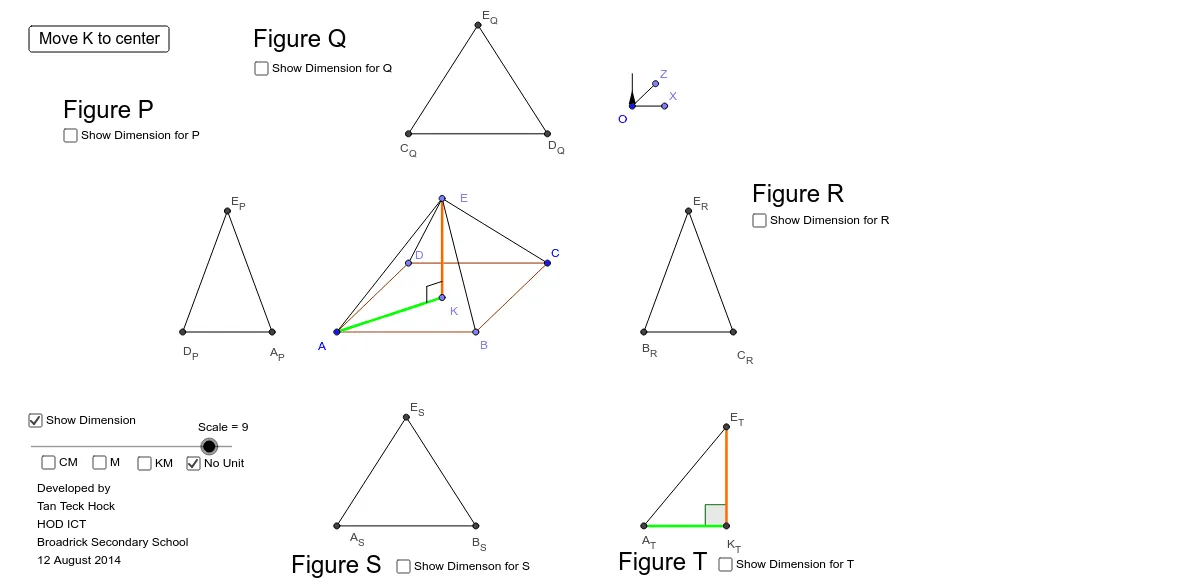
This example demonstrates the geometric construction and property analysis of a 3D shape combining a cube and a trapezoid in three-dimensional space. It involves core mathematical concepts such as trigonometry, quadratic functions, 3D vectors, translation, and solid geometry. The construction utilizes GeoGebra commands and objects like Circle, Point, Segment, Angle, Line, Polygon, PointIn, Intersect, Midpoint, Mirror, Vector, and Translate, as detailed in the construction summary. It is suitable for high school and above students learning about solid geometry, vectors, and transformations.
GeoGebra Commands & Parameters
Circle(O, Radius) → axiscirclePoint(axiscircle) → XSegment(O, X) → OYPoint(axiscircle) → ZAngle(X, O, Z) → αSegment(O, Z) → OZPoint(axiscircle) → YSegment(O, Y) → OXLine(A, OY) → CParallelCBPoint(CParallelCB) → edgeXPtSegment(A, edgeXPt) → edgeXLine(A, OZ) → yaxisPoint(yaxis) → edgeYPtPolygon(edgeYPt, A, edgeXPt) → MaxBase, MaxBaseEdge2, MaxBaseEdge1, MaxBaseEdge3PointIn(MaxBase) → DLine(A, D) → MaxBaseDividerIntersect(MaxBaseEdge3, MaxBaseDivider) → MaxBaseDividerPtPolygon(MaxBaseDividerPt, A, edgeXPt) → MaxBaseLowerHalf, MaxBaseLowerHalfEdge2, MaxBaseLowerHalfEdge1, MaxBaseLowerHalfEdge3PointIn(MaxBaseLowerHalf) → BLine(B, OZ) → BParallelZIntersect(BParallelZ, edgeX) → B_XLine(B, OY) → BParallelXMidpoint(B, D) → MidPointBDMirror(A, MidPointBD) → CPolygon(A, B, C, D) → Base, AB, BD, CD, ACPointIn(Base) → KLine(K, OX) → VerticalFromBasePoint(VerticalFromBase) → VerticalFromBasePtSegment(K, VerticalFromBasePt) → MaxHeightPoint(MaxHeight) → ELine(K, OZ) → KParallelZIntersect(KParallelZ, BParallelX) → K_XLine(K, OY) → KParallelXSegment(A, edgeYPt) → edgeYIntersect(BParallelX, edgeY) → B_ZIntersect(KParallelX, edgeY) → K_ZCircle(B_S, LengthEB / Scale) → CircleAtB_SCircle(A_S, LengthEA / Scale) → CircleAtA_SLine(D, OZ) → CParallelZIntersect(CParallelZ, edgeX) → C_XLine(D, OY) → CParallelXIntersect(CParallelX, edgeY) → C_ZLine(C, OZ) → DParallelZIntersect(DParallelZ, CParallelCB) → D_XLine(C, OY) → DParallelXIntersect(DParallelX, yaxis) → D_ZCircle(A_P, LengthEA / Scale) → CircleAtA_PCircle(D_P, LengthEC / Scale) → CircleAtC_PCircle(B_R, LengthEB / Scale) → CircleAtB_RPoint(OX) → RightAngleDistanceVector(O, RightAngleDistance) → uTranslate(K, u) → DKA3Line(A, OX) → zaxisPoint(zaxis) → edgeZPtSegment(A, edgeZPt) → edgeZSegment(K, E) → KDSegment(A, E) → DASegment(E, D) → DCSegment(E, B) → DBSegment(B_R, C_R) → BC_QCircle(C_R, LengthED / Scale) → CircleAtD_RIntersect(CircleAtB_R, CircleAtD_R) → E_R, D_{Q'}, ,Segment(C_R, E_R) → DC_QSegment(E_R, B_R) → DB_QIntersect(CircleAtA_S, CircleAtB_S) → E_S, T_{R'}, ,Segment(E_S, A_S) → AC_RSegment(A_S, B_S) → AB_RSegment(B_S, E_S) → BC_RCircle(K, KVertical) → CircleAtKCircle(B, BAnglePoint1) → CircleAtBCircle(D, 0.5) → CircleAtCCircle(A, 0.5) → CircleAtAIntersect(CircleAtC_P, CircleAtA_P) → E_P, D_{P'}, ,Segment(E_P, A_P) → DA_PSegment(E_P, D_P) → DC_PSegment(A_P, D_P) → AC_PMidpoint(A, D) → MidPointADMidpoint(A_S, E_S) → MidPointEA_SMidpoint(A, B) → MidPointABMidpoint(A_S, B_S) → MidPointAB_SMidpoint(B_S, E_S) → MidPointEB_SMidpoint(E_R, C_R) → MidPointEC_RMidpoint(E, D) → MidPointEDMidpoint(E, B) → MidPointEBMidpoint(B_R, C_R) → MidPointBC_RMidpoint(B_R, E_R) → MidPointEB_RMidpoint(E, K) → MidPointEKMidpoint(A, E) → MidPointEAMidpoint(A_P, D_P) → MidPointAD_PMidpoint(E_P, A_P) → MidPointAE_PMidpoint(E_P, D_P) → MidPointDE_PAngle(E_P, A_P, D_P) → DAC_PAngle(A_P, D_P, E_P) → DCA_PAngle(E_R, C_R, B_R) → DCB_QAngle(C_R, B_R, E_R) → DBC_QSegment(C, E) → EDAngle(B_S, A_S, E_S) → TAB_RAngle(E_S, B_S, A_S) → TBA_RSegment(A_T, K_T) → AK_SSegment(K_T, E_T) → TK_SSegment(E_T, A_T) → TA_SAngle(E_T, K_T, A_T) → TKA_SCircle(D_Q, LengthED / Scale) → CircleAtD_QCircle(C_Q, LengthEC / Scale) → CircleAtC_QIntersect(CircleAtD_Q, CircleAtC_Q) → E_1, E_Q, ,Segment(C_Q, D_Q) → CD_QSegment(D_Q, E_Q) → TD_QSegment(E_Q, C_Q) → TC_QAngle(E_Q, D_Q, C_Q) → TDC_QAngle(D_Q, C_Q, E_Q) → TCD_QMidpoint(E, C) → MidPointECMidpoint(B, C) → MidPointBCMidpoint(E_Q, D_Q) → MidPointED_QMidpoint(C_Q, D_Q) → MidPointCD_QMidpoint(E_Q, C_Q) → MidPointEC_QMidpoint(C, D) → MidPointCDSegment(A, K) → AKMidpoint(A, K) → MidPointAKMidpoint(E_T, K_T) → MidPointEK_TMidpoint(A_T, K_T) → MidPointAK_TMidpoint(E_T, A_T) → MidPointEA_TIntersect(CircleAtK, KD) → EKA_1,Intersect(CircleAtK, AK) → EKA_2,Line(EKA_2, KD) → ParallelEKLine(EKA_1, AK) → ParallelAKIntersect(ParallelAK, ParallelEK) → EKA_3Segment(EKA_2, EKA_3) → EKA_{L1}Segment(EKA_3, EKA_1) → EKA_{L2}Midpoint(A, C) → MidPointAC
AI Drawing Prompt Reference
Draw a 3D shape combining a cube and a trapezoid, showing its construction and properties. Start by drawing a circle and marking points on it, then connect these points to the center to form line segments. Use these segments and points to construct angles, and based on this, draw parallel lines and triangles. Next, create new points and polygons using midpoints and mirror operations, finally forming the combined shape of the cube and trapezoid, with key points and lines labeled.
The prompt above was compiled from the original drawing commands and is for reference only.