
Shape Matching Game
Loading the math board and drawing, please wait…
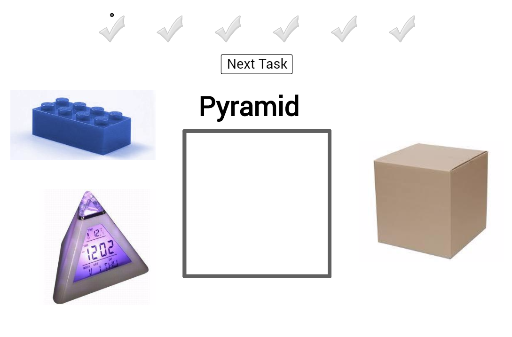
This example demonstrates a shape recognition and matching game where users drag the correct geometric figure to the designated area based on its name. Core mathematical concepts include polygon recognition, solid geometry (cube, prism, pyramid), and coordinate geometry. Key GeoGebra commands and objects used in construction are Polygon, Midpoint, and Vector. Suitable for middle school and above students for reinforcing geometric knowledge in a fun way.
GeoGebra Commands & Parameters
Polygon(A, B, 4) → poly1, f, g, h, i, C, DMidpoint(E, Corner[pic1, 3]) → Q_1Midpoint(A_1, Corner[pic11, 3]) → R_1Midpoint(W, Corner[pic10, 3]) → S_1Midpoint(S, Corner[pic8, 3]) → T_1Midpoint(G_1, Corner[pic14, 3]) → U_1Midpoint(G, Corner[pic3, 3]) → V_1Midpoint(E_1, Corner[pic13, 3]) → W_1Midpoint(U, Corner[pic9, 3]) → Z_1Midpoint(I_1, Corner[pic15, 3]) → A_2Midpoint(M, Corner[pic2, 3]) → B_2Midpoint(O, Corner[pic6, 3]) → C_2Midpoint(K, Corner[pic5, 3]) → D_2Midpoint(C_1, Corner[pic12, 3]) → E_2Midpoint(Q, Corner[pic7, 3]) → F_2Midpoint(I_3, Corner[pic20, 3]) → S_3Midpoint(K_3, Corner[pic21, 3]) → T_3Midpoint(Q_3, Corner[pic22, 3]) → U_3Midpoint(I, Corner[pic4, 3]) → V_3Vector(J_2, K_2) → u
AI Drawing Prompt Reference
Draw a geometric scene with multiple polygons, midpoints, and vectors to demonstrate a shape recognition and matching game. Start by creating a quadrilateral, then find and mark the midpoints of several points, and finally connect some points with vectors to form a solid geometry setting suitable for middle school students to understand polygons, cubes, prisms, and pyramids.
The prompt above was compiled from the original drawing commands and is for reference only.