
Shape Enlargement
Loading the math board and drawing, please wait…
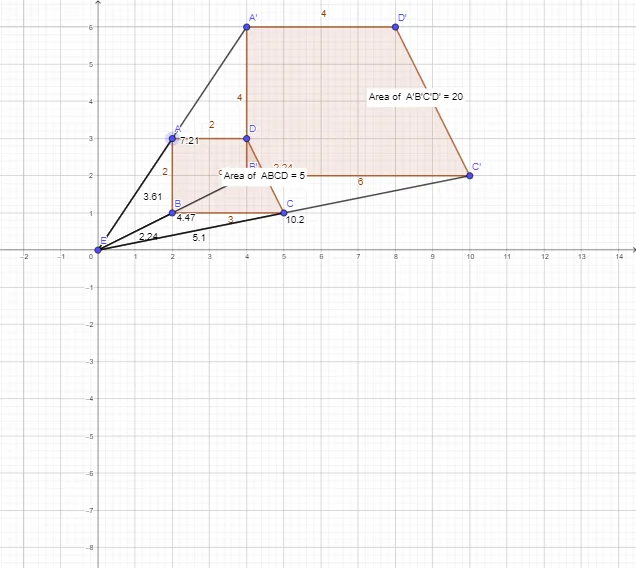
This example demonstrates the geometric transformation process of shape enlargement, involving core math concepts like similarity transformation, proportional scaling, and geometric construction. It utilizes GeoGebra commands such as Polygon, Dilate, PointIn, and Segment. Suitable for high school mathematics education to understand properties and applications of similar figures and transformations.
GeoGebra Commands & Parameters
Polygon(A, B, C, D) → q1, a, b, c, dDilate(A, s, E) → A'Dilate(B, s, E) → B'Dilate(C, s, E) → C'Dilate(D, s, E) → D'Polygon(A', B', C', D') → q1', a', b', c', d'PointIn(q1) → Pointq1PointIn(q1') → Pointq1'Segment(E, B) → fSegment(E, B') → gSegment(E, A) → hSegment(E, A') → iSegment(E, C) → jSegment(E, C') → k
AI Drawing Prompt Reference
Draw a quadrilateral ABCD, then enlarge it by a factor of s with point E as the center to get quadrilateral A'B'C'D'. Next, choose a point inside each quadrilateral and draw line segments connecting this point to each vertex of quadrilateral ABCD and A'B'C'D'.
The prompt above was compiled from the original drawing commands and is for reference only.