
Plane Equation
Loading the math board and drawing, please wait…
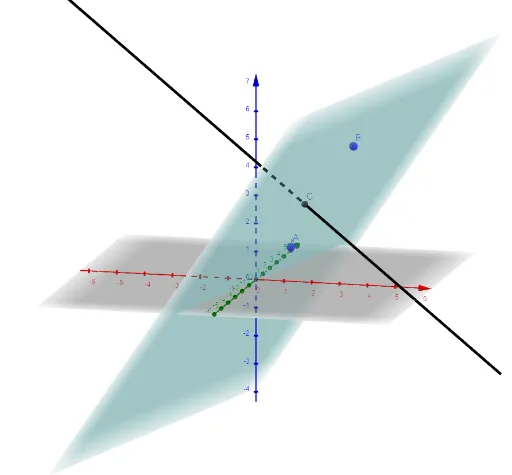
This example demonstrates the plotting and visualization of plane equations in 3D space. Core math concepts include plane equations Ax+By+Cz+D=0, normal vectors, and 3D coordinate systems. It uses GeoGebra commands Plane for drawing the plane and OrthogonalLine for the normal vector. Suitable for high school students and above studying spatial geometry and linear algebra, or for university introductory courses.
GeoGebra Commands & Parameters
Plane(C, A, B) → pOrthogonalLine(C, p) → f
AI Drawing Prompt Reference
In a 3D coordinate space, draw a plane that passes through a given point and is defined by the corresponding direction information (equivalently by the plane equation form). Then, at that same point, construct a line segment (or line) representing the normal direction to the plane. Make sure the normal is orthogonal to the plane, clearly illustrating the relationship between the point, the plane, and the perpendicular normal.
The prompt above was compiled from the original drawing commands and is for reference only.