
Serlio Geometric Construction Example
Loading the math board and drawing, please wait…
In collections
circles, ovals, ellipses and architecture
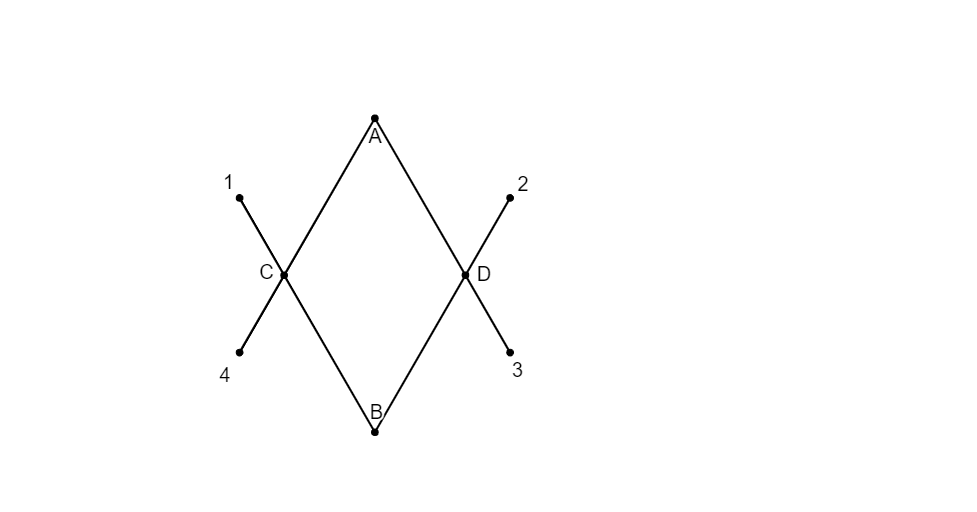
This example demonstrates the geometric construction process based on Serlio's principles, involving operations like mirroring, rotating, and intersecting; core math concepts include transformation, angles, and geometric construction; construction highlights are derived from GeoGebra commands: point construction, mirroring, rotation, ray, segment, intersection, circular arc; suitable for high school mathematics teaching or for geometry enthusiasts learning complex geometric construction techniques.
GeoGebra Commands & Parameters
ConstructionStep() → stapPoint(yAxis) → PMirror(P, xAxis) → QRotate(O, 30°, Q) → OQRay(Q, OQ) → fPoint(f) → RSegment(Q, R) → gMirror(Q, yAxis) → Q'Mirror(R, yAxis) → R'Segment(Q', R') → g'Mirror(Q, xAxis) → Q'_{1}Mirror(R, xAxis) → R'_{1}Segment(Q'_{1}, R'_{1}) → g'_{1}Mirror(Q', xAxis) → Q''Mirror(R', xAxis) → R''Segment(Q'', R'') → g''Intersect(g, g'_{1}) → CIntersect(g', g'') → DCircleArc(A, R'_{1}, R'') → cCircleArc(B, R', R) → dCircleArc(C, R, R'_{1}) → eCircleArc(D, R'', R') → h
AI Drawing Prompt Reference
Create a geometric construction example based on Serlio's principles, including the mirroring of points P and Q, the line segment g between points Q and R, and their respective mirrors g' and g''. Use intersection points C and D to connect arcs c, d, e, and h, forming a complex geometric shape.
The prompt above was compiled from the original drawing commands and is for reference only.