
Sequential Limits: Divergent
Loading the math board and drawing, please wait…
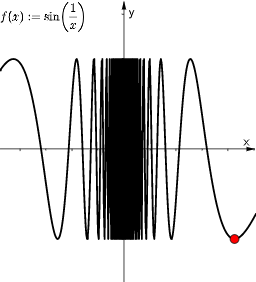
This example demonstrates the concept of divergent sequential limits, visually representing scenarios where a sequence does not converge to a specific value. Key mathematical concepts include sequential limits, divergence, and function graphing. GeoGebra commands used in construction are: SelectedIndex for selecting list elements, Element for extracting elements, Zip for combining lists, ListFunc for creating function lists, ListName for defining list names, ind for index, SelectedFunc for selecting functions, n for iteration count, Ln for natural logarithm, k as a parameter, and various text and list objects like text3, f, l1, l2, l3, and labels text1, text2, text4, text5, with speed controlling animation. Suitable for high school and above mathematics learners to understand limit theory and function behavior.
GeoGebra Commands & Parameters
SelectedIndex(ListName) → indElement(ListFunc, ind) → SelectedFuncZip(SelectedFunc(s), s, Ln) → l1Zip((x0, y0), x0, Ln, y0, l1) → l2Zip((x0, f(x0)), x0, l1) → l3
AI Drawing Prompt Reference
Create a visual construction illustrating divergent sequential limits: start from the natural logarithm function (ln) with parameter k, generate a list of ln(x) values over an indexed set of x terms, and pair each x with its corresponding logarithm value to form a sequence of points/steps representing the values of the ln-based sequence. Arrange the points according to the same index relationship so the viewer can see that the sequence does not settle to a single fixed limit. Add clear text annotations that label the scenario as a sequential limit and divergence concept, and keep the main focus on the relationship between the x terms and their ln(x) outputs.
The prompt above was compiled from the original drawing commands and is for reference only.