
Segment Addition Postulate: Formative Assessment
Loading the math board and drawing, please wait…
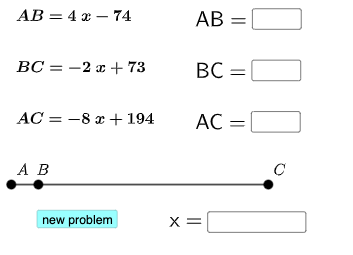
This example illustrates the Segment Addition Postulate, involving fundamental geometric concepts. Using GeoGebra commands such as Sequence and RandomElement, users can dynamically explore the principle of segment addition. Suitable for middle school and above students for geometry learning and formative assessment.
GeoGebra Commands & Parameters
Sequence(i, i, -20, 20, 0.25) → l1RandomElement(l1) → solRandom(1, 50) → lsRandom(1, 50) → rsUnion(Sequence[i, i, -10, -1, 1], Sequence[i, i, 1, 10, 1]) → c1listRandomElement(c1list) → c1Union(Sequence[i, i, -10, -1, 1], Sequence[i, i, 1, 10, 1]) → c2listRandomElement(c2list) → c2Union(Sequence[i, i, -10, -1, 1], Sequence[i, i, 1, 10, 1]) → c3listRandomElement(c3list) → c3Simplify(g) → rSimplify(h) → sSimplify(p) → tSegment(A, B) → iTextfield(j) → InputBox1Textfield(k) → InputBox2Textfield(l) → InputBox3Textfield(m) → InputBox4If(j ≟ sol, "√", "X") → text4If(k ≟ ls, "√", "X") → text5If(l ≟ rs, "√", "X") → text6If(m ≟ tot, "√", "X") → text7
AI Drawing Prompt Reference
Draw a geometric figure containing two line segments A and B, along with several random points. The figure should illustrate the relationship between the lengths of segments A and B, and use symbols like √ or X to indicate comparisons between points and line segments. The construction order should be: first draw line segments A and B, then generate random points, and finally add markers to show comparison results.
The prompt above was compiled from the original drawing commands and is for reference only.