
From Number Line to Number Plane
Loading the math board and drawing, please wait…
In collections
Rationale Zahlen & Arbeiten mit der Zahlengerade
Ganze Zahlen & Arbeiten mit der Zahlengerade
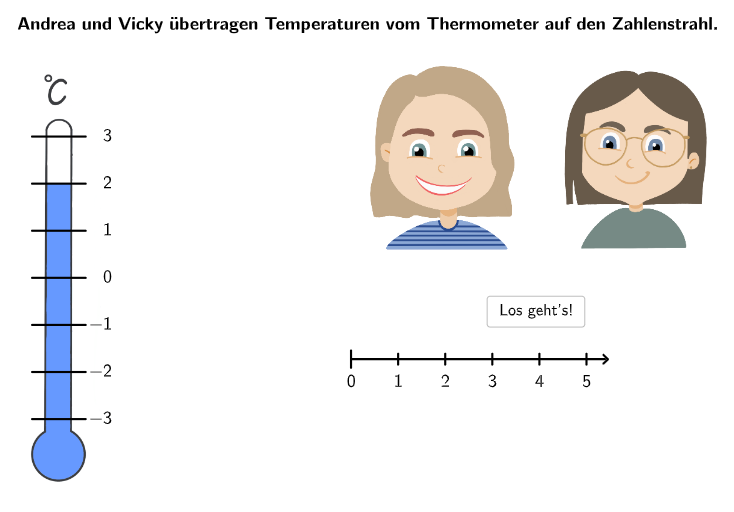
This GeoGebra example demonstrates the transition from a number line to a number plane. It involves the core mathematical concepts of integers, negative numbers, and positive numbers. The construction points include using GeoGebra's Sequence, Element, and Textfield commands to create the number line and number plane. This example is suitable for middle school mathematics education, particularly for understanding integers and number lines.
GeoGebra Commands & Parameters
Sequence(Random[1, 10], i, 1, 10) → randomNumbers, {4, 1, 8, 1, 10, 2, 10, 2, 7, 4}Element(randomNumbers, Mod[questionCount, Length[randomNumbers]] + 1) → randomNumberTextfield(input) → inputBoxCorner(picTerm, 3) → PosTherm15Sequence(Segment[PosListTherm(k), PosListTherm(k) + ((radius - (2 * disX) + 0.1) * UnitVector[Vector[PosTherm12, PosTherm11]])], k, 1, 7) → SegThermSegment(Origin, Origin + ((disY * 5) + 0.5, 0)) → segPSequence(Origin + ((k * disY) - (5 * disY), 0), k, 0, 10) → PosPointAxisSequence(Text[(("\textsf{" * k) * "}"), PosPointAxis(k + 6) + (0, -0.125), false, true, 0, -1], k, 0, 5) → capPAxisSequence(Text[(("\textsf{\(-\)" * k) * "}"), PosPointAxis(6 - k) + (-0.15, -0.125), false, true, 0, -1], k, 1, 5) → capMAxisTake(PosPointAxis, 6, 11) → PosPointPAxisSpeechBubbleRight(SBPos, sbwidth, sbheight) → SBTextfield(input021) → InputBox021Point(Join[{{Origin + (0, 1.5)}, PosPointPAxis}]) → Point022Textfield(input031) → InputBox031Segment(PosListTherm(3), PosListTherm(3) + ((radius - (2 * disX) + 0.1) * UnitVector[Vector[PosTherm12, PosTherm11]])) → segM1Textfield(input091) → InputBox091SelectedIndex(dropdown121) → index121SelectedIndex(dropdown122) → index122Point(Join[{{Origin + ((-5 * disY), 1.5)}, PosPointAxis}]) → Point111Point(First[PosPointAxis, 6]) → Point081If(step ≟ 2, correct021 ∧ correct022, step ≟ 10, BeschriftungVervollständigen ∧ correct101, step ≟ 11, correct111, true, step ≟ 3, correct031, step ≟ 6, drehzahl ≟ 1, step ≟ 8, Point081 ≟ PosPointAxis(1), step ≟ 9, correct091) → clickableBtnNextSegment(Origin, Point081 + (-0.5, 0)) → segMTextfield(input101) → InputBox101SelectedIndex(dropdown091) → index091Text(RotateText["\textsf{\(-1\)}", (drehzahl * If[mitdrehen, -90°, 0°])], PosCapM1 + ((disCap * drehzahl), 0), false, true, 0, 0) → capM1Text(RotateText["\textsf{\(-2\)}", (drehzahl * If[mitdrehen, -90°, 0°])], PosCapM2 + ((disCap * drehzahl), 0), false, true, 0, 0) → capM2Text(RotateText["\textsf{\(-3\)}", (drehzahl * If[mitdrehen, -90°, 0°])], PosCapM3 + ((disCap * drehzahl), 0), false, true, 0, 0) → capM3Text(RotateText["\textsf{\(\phantom{-}0\)}", (drehzahl * If[mitdrehen, -90°, 0°])], PosCapP0 + ((disCap * drehzahl), 0), false, true, 0, 0) → capP0Text(RotateText["\textsf{\(\phantom{-}1\)}", (drehzahl * If[mitdrehen, -90°, 0°])], PosCapP1 + ((disCap * drehzahl), 0), false, true, 0, 0) → capP1Text(RotateText["\textsf{\(\phantom{-}2\)}", (drehzahl * If[mitdrehen, -90°, 0°])], PosCapP2 + ((disCap * drehzahl), 0), false, true, 0, 0) → capP2Text(RotateText["\textsf{\(\phantom{-}3\)}", (drehzahl * If[mitdrehen, -90°, 0°])], PosCapP3 + ((disCap * drehzahl), 0), false, true, 0, 0) → capP3Text(RotateText["\textsf{\textcolor{#db6114}{\bold{\(-1\)}}", If[mitdrehen, -90°, 0°]], PosCapM1 + (disCap / 2, 0), false, true, 0, 0) → capM1_7If(step ≠ 10, SBPos + ((-sbwidth) - 0.6, 0) + (0, If[step ≟ 9, -1.15, 0]), Corner[txt102, 3] + (0.5, 0.05)) → PosBtnShowSolution
AI Drawing Prompt Reference
Create a number line with evenly spaced tick positions, using the origin as a reference. Label negative positions above or below the axis with text for −1, −2, and −3, and label nonnegative positions with text for 0, 1, 2, and 3 at their corresponding ticks. Construct the axis line and key tick points first, then place each number label near the matching tick. After that, add a transition toward a number plane by drawing grouped line segments starting from the origin and extending toward several positions in one direction, giving the visual setup for moving from 1D to 2D. Include a small corner callout-style box with placeholder corner text on the left side.
The prompt above was compiled from the original drawing commands and is for reference only.