
Sector Area Exploration
Loading the math board and drawing, please wait…
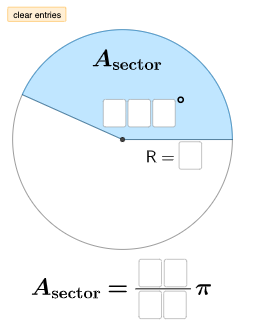
This example demonstrates how to explore the changes in sector area by adjusting the central angle and radius. Key mathematical concepts include the area of a circle, angles, and arc length. Using GeoGebra commands such as CircleSector, Angle, and Rotate, the relationship between the sector area and the central angle and radius can be dynamically displayed. Suitable for middle school and above students or teachers for teaching and learning.
GeoGebra Commands & Parameters
Intersect(xAxis, yAxis) → ACircle(A, B) → c_{1}Point(c_{1}) → CSegment(A, C) → iCircleArc(A, B, C) → eCircleArc(A, C, B) → kTextfield(a) → InputBox1Textfield(b) → InputBox2Textfield(c) → InputBox3Textfield(d) → InputBox4Textfield(f) → InputBox5Textfield(g) → InputBox6Textfield(h) → InputBox7Textfield(j) → InputBox8Segment(A, B) → lCircle(D, d) → pRotate(E, (((100 * a) + (10 * b) + c) * pi / 180), D) → E'CircleArc(D, E, E') → qCircleArc(D, E', E) → rSegment(D, E) → mAngle(E, D, E') → αSegment(D, E') → nRotate(E, ((10 * f) + g) / ((10 * h) + j), D) → E'_{1}If((((10 * f) + g) * pi / ((10 * h) + j)) ≟ (((100 * a) + (10 * b) + c) * ((pi * d^(2))) / 360), "Sector area is correct!", (((10 * f) + g) * pi / ((10 * h) + j)) < (((100 * a) + (10 * b) + c) * ((pi * d^(2))) / 360), "Sector area is too small!", (((10 * f) + g) * pi / ((10 * h) + j)) > (((100 * a) + (10 * b) + c) * ((pi * d^(2))) / 360), "Sector area is too large!") → text4RotateText(text4, ((-pi)) / 6) → text5Mode(l1) → l2Length(l2) → oIf(o ≟ 0, "No digits repeat.", "You have a repeated digit.") → text6RotateText(text6, ((-pi)) / 6) → text7CircleSector(A, B, C) → s
AI Drawing Prompt Reference
Create an interactive exploration of sector area. Start with a circle centered at the origin, place a point on the circle, and draw a radius from the center to that point. Add two circular arcs to complete the circle. Place several input boxes for entering angle and radius values. Then, using another center point, rotate a point by the entered angle to form a new sector, displaying its central angle. Calculate the sector area based on inputs and show text indicating whether the area is correct, too small, or too large. Also check if any input digits repeat and display a message. The final figure includes two circles, multiple sectors, radius segments, angle labels, and text feedback.
The prompt above was compiled from the original drawing commands and is for reference only.