
Sections of Rectangular Pyramids by Anthony OR 柯志明
Loading the math board and drawing, please wait…
In collections
Area, Surface Area, Volume, Cross Section, 3D
3D Geometry & Cross Sections
Geometry - Areas and Volumes
Sections of 3D Shapes
Cross Sections
Cross sections
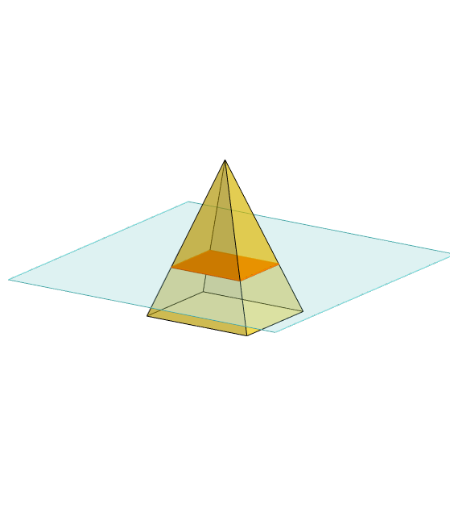
This example demonstrates different sections of a rectangular pyramid. Key mathematical concepts include solid geometry. Using GeoGebra commands such as Polygon, PointIn, Translate, Rotate, Pyramid, Plane, IntersectPath, etc., one can construct a rectangular pyramid and its sections. Suitable for high school students or teachers.
GeoGebra Commands & Parameters
Polygon(B + (-2, -2), B + (2, -2), B + (2, 2), B + (-2, 2)) → poly3, e, f, g, iPointIn(poly3) → CTranslate((0, 0, 0), Vector[B, C]) → APolygon(A + (-4, -4), A + (4, -4), A + (4, 4), A + (-4, 4)) → poly1, a, b, c, dRotate(Rotate[Translate[poly1, Vector[A, A + (0, 0, h)]], (90° * s), A + (0, 0, h), yAxis], (90° * t), A, zAxis) → poly2Pyramid(Polygon[(-1.5, -1.25, 0), (1.5, -1.25, 0), (1.5, 1.25, 0), (-1.5, 1.25, 0)], (0, 0, 4)) → m, face1, face2, face3, face4, edge1, edge2, edge3, edge4Rotate(D, 120°, (0, 0, 0)) → EPolygon(D, E, 3, xOyPlane) → poly4, j, k, l, FPointIn(poly2) → GPointIn(poly2) → HPointIn(poly2) → IPlane(G, I, H) → nIntersectPath(n, m) → poly6, poly5, r, a_1, b_1, c_1, K, L_1, O, P, J, L, p, qRotate(m, 0, zAxis) → m'Rotate(m, 0, zAxis) → m'_1OrthogonalLine(A, n) → d_1
AI Drawing Prompt Reference
Draw a rectangular pyramid and show its different sections. Start by creating a rectangular base, then extend it vertically to form the pyramid. Next, draw three parallelograms on the sides of the pyramid to represent different sections. Finally, use rotation and intersection to show the lines where the pyramid intersects with planes, creating complex section shapes.
The prompt above was compiled from the original drawing commands and is for reference only.