
Sections of Cones by Anthony OR 柯志明
Loading the math board and drawing, please wait…
In collections
Area, Surface Area, Volume, Cross Section, 3D
3D Geometry & Cross Sections
Geometry - Areas and Volumes
Sections of 3D Shapes
Cross sections
Cross Sections
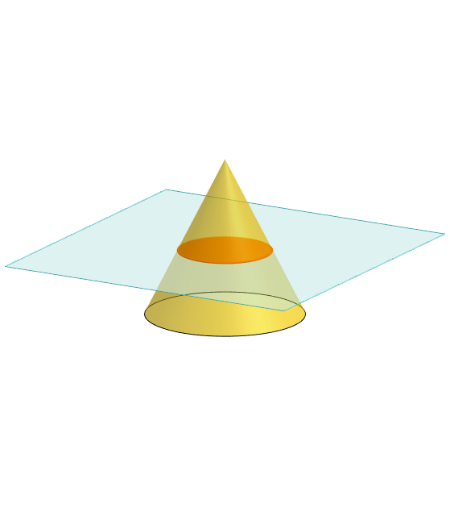
This example demonstrates different sections of a cone using GeoGebra, highlighting geometric and calculus concepts. Key mathematical ideas include solid geometry, coordinate geometry, and integral calculus. Construction involves commands like Polygon, PointIn, Translate, Rotate, Cone, Plane, IntersectPath, and others. Suitable for high school students or college freshmen learning geometry and calculus fundamentals.
GeoGebra Commands & Parameters
Polygon(B + (-2, -2), B + (2, -2), B + (2, 2), B + (-2, 2)) → poly3, e, f, g, iPointIn(poly3) → CTranslate((0, 0, 0), Vector[B, C]) → APolygon(A + (-4, -4), A + (4, -4), A + (4, 4), A + (-4, 4)) → poly1, a, b, c, dRotate(Rotate[Translate[poly1, Vector[A, A + (0, 0, h)]], (90° * s), A + (0, 0, h), yAxis], (90° * t), A, zAxis) → poly2Rotate(D, 120°, (0, 0, 0)) → ECone((0, 0, 0), (0, 0, 4), 2) → m, e_1, oPolygon(D, E, 3, xOyPlane) → poly4, j, k, l, FPointIn(poly2) → GPointIn(poly2) → HPointIn(poly2) → IPlane(G, I, H) → nIntersectPath(n, m) → poly6OrthogonalLine(A, n) → d_1Ends(m) → g_1, g_1_1
AI Drawing Prompt Reference
Draw a geometric figure formed by the intersection of a cone and a plane. The cone has its vertex at the origin, a base radius of 2, and a height of 4. The plane intersects the cone's side and base, creating a cross-section. The figure includes the cone, the plane, the intersecting path, and related points. The construction order starts with the cone, then the plane, and finally the intersecting section.
The prompt above was compiled from the original drawing commands and is for reference only.