
Second Contour Points of Torus Intersection
Loading the math board and drawing, please wait…
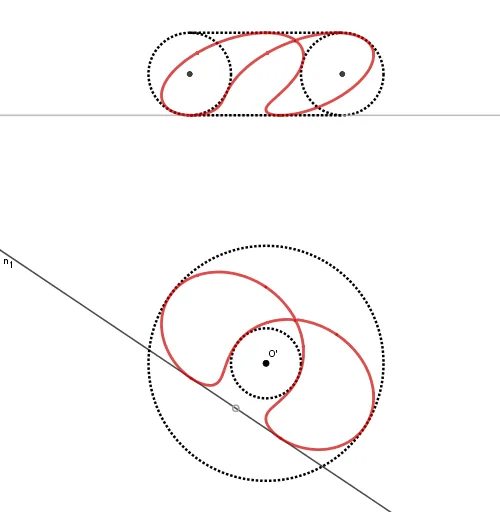
This example demonstrates the second contour points of the intersection of a torus. Key mathematical concepts include coordinate geometry and geometric construction. Using GeoGebra commands such as Line, Point, Circle, Intersect, etc., the intersection of the torus and its second contour points can be constructed. Suitable for high school mathematics education and learning.
GeoGebra Commands & Parameters
Line(O', A) → fPoint(f) → BCircle(O', B) → cPoint(f) → CCircle(O', C) → dOrthogonalLine(O', f) → gMidpoint(B, C) → DOrthogonalLine(D, f) → hPoint(g) → EOrthogonalLine(E, g) → iIntersect(h, i) → FCircle(F, Segment[D, C]) → eMirror(e, g) → e'Mirror(h, g) → h'_1Intersect(e', h'_1, 2) → GIntersect(e, h, 2) → HSegment(G, H) → jIntersect(e', h'_1, 1) → IIntersect(e, h, 1) → JSegment(I, J) → kLine(O', K) → lOrthogonalLine(K, l) → n_1Line(I, J) → n_2Line(G, H) → pPoint(l) → LOrthogonalLine(L, l) → qOrthogonalLine(K, f) → rOrthogonalLine(L, f) → sIntersect(r, n_2) → MIntersect(s, p) → NSegment(M, N) → tPoint(t) → P_2OrthogonalLine(P_2, g) → aIntersect(e', a) → Q, P_0''pIntersect(e, a) → S, TIntersect(a, g) → UCircle(O', Segment[U, Q]) → c_1Circle(O', Segment[U, P_0''p]) → d_1OrthogonalLine(P_2, i) → bIntersect(l, b) → VOrthogonalLine(V, l) → f_1Center(e') → I_1Intersect(d_1, f_1) → P', ZIntersect(c_1, f_1) → A_1, B_1Locus(P', P_2) → ponthalmaz1Locus(A_1, P_2) → ponthalmaz2Locus(B_1, P_2) → ponthalmaz3Locus(Z, P_2) → ponthalmaz4OrthogonalLine(Z, f) → g_1OrthogonalLine(B_1, f) → h_1OrthogonalLine(A_1, f) → i_1OrthogonalLine(P', f) → j_1Intersect(g_1, a) → C_1Intersect(h_1, a) → D_1Segment(P_0''p, S) → k_2Intersect(i_1, a) → E_1Intersect(j_1, a) → P''Locus(P'', P_2) → ponthalmaz5Locus(E_1, P_2) → ponthalmaz6Locus(D_1, P_2) → ponthalmaz7Locus(C_1, P_2) → ponthalmaz8Point(n_1) → OOrthogonalLine(O, n_1) → mIntersect(q, m) → PMirror(m, O') → m'Intersect(n_1, m') → RIntersect(q, m') → WOrthogonalLine(O, n_2) → nOrthogonalLine(P, n_2) → k_1OrthogonalLine(R, n_2) → l_1OrthogonalLine(W, p) → m_1Intersect(n, n_2) → F_1Intersect(k_1, p) → G_1Intersect(l_1, n_2) → H_1Intersect(m_1, p) → J_1Polygon(P, W, R, O) → q1, h', w, r_1, oPolygon(F_1, G_1, J_1, H_1) → q2, s_1, h'', a_1, b_1OrthogonalLine(O', l_1) → e_1Intersect(e_1, q) → K_1Intersect(e_1, n_1) → L_1Segment(L_1, K_1) → v'OrthogonalLine(L_1, n_2) → g_2OrthogonalLine(K_1, n_2) → h_2Intersect(g_2, n_2) → M_1Intersect(h_2, p) → N_1Line(O', P') → q_1Segment(L_1, M_1) → i_2Segment(K_1, N_1) → j_2Segment(M_1, N_1) → v''Intersect(e', v'') → O_1, P_1Intersect(e, v'') → Q_1, R_1OrthogonalLine(O_1, p) → m_2OrthogonalLine(P_1, p) → p_2OrthogonalLine(Q_1, n_2) → q_2OrthogonalLine(R_1, n_2) → r_2Intersect(r_2, e_1) → S_1Intersect(q_2, e_1) → T_1Intersect(p_2, e_1) → U_1Intersect(m_2, e_1) → V_1Segment(O_1, V_1) → s_2Segment(U_1, P_1) → t_2Segment(Q_1, T_1) → a_2Segment(S_1, R_1) → b_2
AI Drawing Prompt Reference
Draw the second contour points of a torus. Start by creating a line f through points O' and A, then take points B and C on f, and draw circles c and d with O' as the center and B and C as the radii, respectively. Construct a line g perpendicular to f, find the midpoint D of B and C, and then construct line h perpendicular to f through D. Through a series of intersection and reflection operations, you will eventually obtain the second contour point P2 of the torus.
The prompt above was compiled from the original drawing commands and is for reference only.