
Seat Cushion or Pool Float? GeoGebra AR Quick Demo
Loading the math board and drawing, please wait…
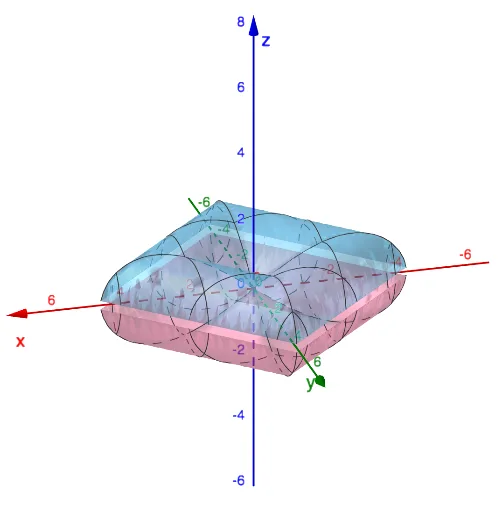
This example demonstrates surface properties and buoyancy principles of different shaped objects (seat cushion vs. pool float) using GeoGebra Augmented Reality. It involves core math concepts like surface modeling, trigonometric functions, logarithmic functions, hypothesis testing, inequalities, and arithmetic operations. Construction highlights the use of GeoGebra commands with objects 'a' and 'b' for parametric modeling and dynamic adjustments. Suitable for high school students and teachers to understand function applications and spatial geometry relationships.
GeoGebra Commands & Parameters
a(x, y) = If[(-x) - 4.45 ≤ y ≤ (-x) + 4.45 ∧ x - 4.45 ≤ y ≤ x + 4.45, sqrt(abs((((abs(x) * cos(π / 4)) + (abs(y) * sin(π / 4))) * sin((abs(x) * cos(π / 4)) + (abs(y) * sin(π / 4))))))]b(x, y) = If[(-x) - 4.45 ≤ y ≤ (-x) + 4.45 ∧ x - 4.45 ≤ y ≤ x + 4.45, (-sqrt(abs((((abs(x) * cos(π / 4)) + (abs(y) * sin(π / 4))) * sin((abs(x) * cos(π / 4)) + (abs(y) * sin(π / 4)))))))]
AI Drawing Prompt Reference
Draw two symmetric surfaces representing objects of different shapes (like a cushion and a float), showcasing their surface properties and buoyancy principles. Use trigonometric and absolute functions combined with diagonal equations to generate a rhombus outline, modulated by sine functions along the edges to create wavy surfaces. The two surfaces are identical in shape but opposite in orientation, with inequalities defining the visible area to illustrate the buoyancy effect of the objects in water.
The prompt above was compiled from the original drawing commands and is for reference only.