
Schlegel Diagram Icosahedron
Loading the math board and drawing, please wait…
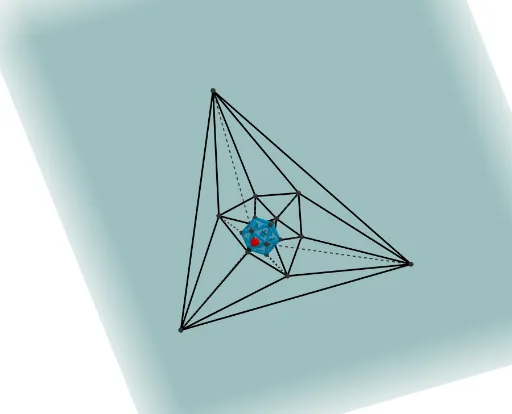
This example demonstrates the Schlegel diagram of an icosahedron, showing how to project the 3D shape onto a 2D plane while preserving its structure. Key mathematical concepts include polygons, solid geometry, and symmetry. The construction utilizes GeoGebra commands like Circle, Intersect, Rotate, Point, Icosahedron, Midpoint, Segment, Line, OrthogonalPlane, Polygon, and Ray. It is suitable for high school students and educators exploring geometric properties of polyhedra.
GeoGebra Commands & Parameters
Circle(OO, 1, xOyPlane) → cIntersect(xAxis, c, 1) → ARotate(A, 72°) → BPoint(Circle[Midpoint[A, B], (Distance[A, B] * sqrt(3) / 2), Segment[A, B]]) → CIcosahedron(A, B, C) → a, D, zijvlakABC, zijvlakACF, zijvlakAFG, zijvlakADG, zijvlakABD, zijvlakBDH, zijvlakBEH, zijvlakBCE, zijvlakCEI, zijvlakCFI, E, zijvlakEHK, zijvlakEIK, zijvlakIKL, zijvlakFIL, zijvlakHJK, zijvlakJKL, zijvlakGJL, zijvlakFGL, zijvlakDHJ, zijvlakDGJ, F, RibbeAC, RibbeAB, RibbeBC, RibbeAF, RibbeCF, RibbeAG, RibbeFG, RibbeAD, RibbeDG, RibbeBD, G, RibbeBH, RibbeDH, RibbeBE, RibbeEH, RibbeCE, RibbeCI, RibbeEI, RibbeFI, RibbeEK, RibbeHK, H, RibbeIK, RibbeIL, RibbeKL, RibbeFL, RibbeJK, RibbeHJ, RibbeJL, RibbeGL, RibbeGJ, RibbeDJ, I, J, K, LMidpoint(RibbeAC) → MSegment(F, M) → fMidpoint(RibbeCF) → NSegment(A, N) → gIntersect(f, g) → OMidpoint(RibbeHK) → PMidpoint(RibbeJK) → QSegment(P, J) → hSegment(Q, H) → iIntersect(h, i) → RLine(O, R) → jPoint(j) → SPoint(j) → TOrthogonalPlane(T, j) → bLine(S, C) → kLine(S, A) → lLine(S, G) → mLine(S, F) → nIntersect(k, j) → ULine(S, L) → pIntersect(n, b) → VIntersect(l, b) → WIntersect(k, b) → ZPolygon(Z, W, V) → driehoek1, v, z_1, wSegment(S, W) → qSegment(S, V) → rSegment(Z, S) → sLine(S, D) → tIntersect(t, b) → A_1Segment(S, A_1) → dRay(S, B) → eIntersect(e, b) → B_1Segment(S, B_1) → f_1Segment(Z, B_1) → g_1Segment(B_1, W) → h_1Line(S, L) → i_1Line(S, G) → j_1Intersect(i_1, b) → C_1Intersect(j_1, b) → D_1Segment(S, C_1) → k_1Segment(S, D_1) → l_1Segment(V, C_1) → m_1Segment(C_1, D_1) → n_1Segment(V, D_1) → p_1Segment(D_1, W) → q_1Segment(D_1, A_1) → r_1Segment(A_1, W) → s_1Segment(A_1, B_1) → t_1Line(S, K) → a_1Line(C, E) → b_1Line(S, I) → c_1Intersect(c_1, b) → E_1Intersect(a_1, b) → F_1Segment(S, F_1) → e_1Segment(S, E_1) → f_2Segment(Z, E_1) → g_2Segment(E_1, V) → j_2Segment(E_1, C_1) → k_2Segment(F_1, C_1) → n_2Segment(F_1, E_1) → p_2Line(S, J) → q_2Intersect(q_2, b) → H_1Segment(S, H_1) → r_2Segment(H_1, C_1) → s_2Segment(H_1, D_1) → t_2Segment(H_1, A_1) → a_2Segment(F_1, H_1) → b_2Line(S, H) → c_2Intersect(c_2, b) → I_1Segment(S, I_1) → d_2Segment(B_1, I_1) → e_2Segment(I_1, F_1) → h_3Segment(I_1, H_1) → i_3Line(S, E) → j_3Intersect(b, j_3) → G_1Segment(Z, G_1) → h_2Segment(E_1, G_1) → i_2Segment(G_1, B_1) → l_2Segment(F_1, G_1) → m_2Segment(G_1, I_1) → d_1Segment(I_1, A_1) → f_3
AI Drawing Prompt Reference
Draw a Schlegel diagram of an icosahedron, showing how to project a 3D shape onto a 2D plane while preserving its structure. Start by drawing a circle and rotating its intersections with an axis to generate multiple points. Use these points to construct the icosahedron. Then, find midpoints of key edges, and use them along with vertices to draw auxiliary lines and planes. Finally, create polygons using intersection points and auxiliary lines to form the 2D projection of the icosahedron.
The prompt above was compiled from the original drawing commands and is for reference only.