
Scalar Multiples
Loading the math board and drawing, please wait…
In collections
Integration
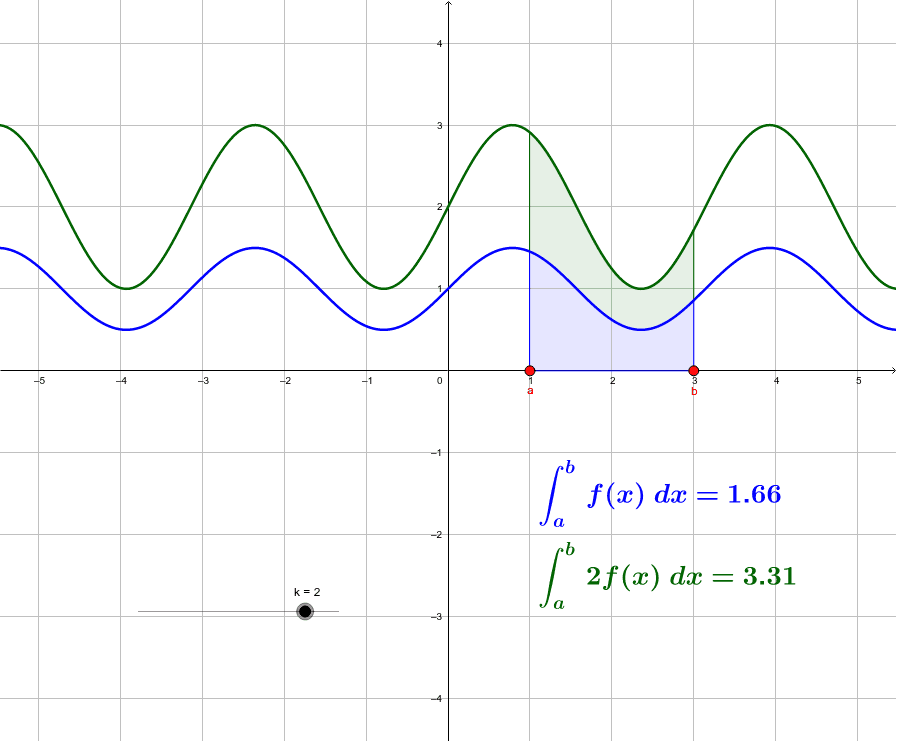
This example demonstrates the effect of scalar multiples on geometric figures (e.g., triangles), showing how adjusting the scalar coefficient dynamically scales the shape. Core mathematical concepts include vectors, geometric transformations, function graphs, and integrals. Construction highlights the use of GeoGebra commands/objects like Point, IntegralBetween, f (function), a,b,a_1 (parameters), k (scalar), g (shape), c,d (texts). Suitable for high school and above learners to explore linear transformations and their impact on geometry.
GeoGebra Commands & Parameters
Point(xAxis) → aPoint(xAxis) → bIntegralBetween(f, 0, x(a), x(b), true) → a_1IntegralBetween(g, f, x(a), x(b), true) → c
AI Drawing Prompt Reference
Draw a coordinate plane with a function curve. Shade the area between this curve and the x-axis, bounded by two points on the x-axis. Above this curve, draw a second curve and shade the region between the two curves, also bounded by the same two x-axis points. Include a slider to adjust a scalar multiplier that scales the entire shape (both curves and shaded areas) proportionally, while the two boundary points stay fixed. Use distinct colors for the two shaded regions to show how the areas change with the scalar.
The prompt above was compiled from the original drawing commands and is for reference only.