
Graphing Exponential Functions (Part 2)
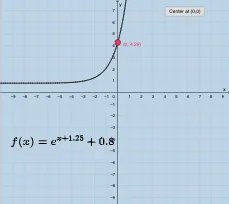
Loading the math board and drawing, please wait…
This GeoGebra example demonstrates how exponential function graphs change under varying parameters, highlighting the growth/decay behavior and linking it to local linear approximations such as tangent lines. It centers on key ideas including exponential functions, tangent line behavior (local trend), and logarithmic functions as the inverse relationship that supports understanding of the exponential form. The construction also incorporates supporting geometric elements—such as vectors and simple polygon/shape references—to visually encode slope, direction, or auxiliary measurements. From the construction summary, the model uses GeoGebra input and labeling tools (Textfield and multiple InputBox controls: InputBox1–InputBox5) to parameterize the functions and update the display; variables like h, a, k, h1, b, c, d, f, g, and A serve as parameters for functions and related quantities; button1 enables interactive updates; and text1/text2 provide on-screen mathematical annotations. Suitable for middle and high school instruction on functions/graphing, classroom demonstrations, and student inquiry into parameter effects.
GeoGebra Commands & Parameters
Textfield(b) → InputBox1Textfield(c) → InputBox2Textfield(k) → InputBox5Textfield(h) → InputBox4Textfield(h) → InputBox3
AI Drawing Prompt Reference
Create a graph showing how exponential function curves change with varying parameters, including tangent lines and geometric elements like vectors to illustrate growth/decay behavior and local linear approximations, with interactive sliders to adjust parameters and observe effects.
The prompt above was compiled from the original drawing commands and is for reference only.