
Exploring Exponential Function Graphs: Parameter Effects
Loading the math board and drawing, please wait…
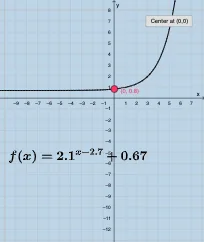
This example demonstrates how the graph of an exponential function changes when its parameters vary, helping learners observe characteristic behaviors of exponential growth and decay. The key mathematical ideas include the general form of exponential functions, how parameters (such as base/coefficients and shifts) affect the curve’s shape, and the resulting qualitative features that can be tested and verified through visualization. In GeoGebra, the construction relies on interactive inputs and labeled objects: multiple Textfield and input boxes (a, h, k, b, c, InputBox1/2/3/5) to set parameters, function-like objects (f, g) to represent the exponential expressions, a button (button1) to trigger updates, and text/auxiliary objects (text1, text2, A, d) for annotation and display. It is well-suited for secondary school and introductory university contexts, especially for dynamic graphing demonstrations and hypothesis-style exploration of function behavior.
GeoGebra Commands & Parameters
Textfield(b) → InputBox1Textfield(c) → InputBox2Textfield(k) → InputBox3Textfield(h) → InputBox5
AI Drawing Prompt Reference
Create a dynamic visualization for exploring how exponential function graphs change with parameters. Provide four adjustable input parameters: b (base or growth/decay factor), c (a scaling coefficient), k (vertical shift/constant term), and h (horizontal shift). Using these four inputs, construct two exponential function curves whose equations depend on the parameters, so the learner can compare the curve shapes as the values vary. Include clear input fields for b, c, k, and h, and leave room for brief annotation indicating that the plotted curves correspond to the exponential expressions controlled by these parameters, enabling observation of typical growth and decay behavior.
The prompt above was compiled from the original drawing commands and is for reference only.