
SAS Congruence Example: Dynamic Construction and Exploration
Loading the math board and drawing, please wait…
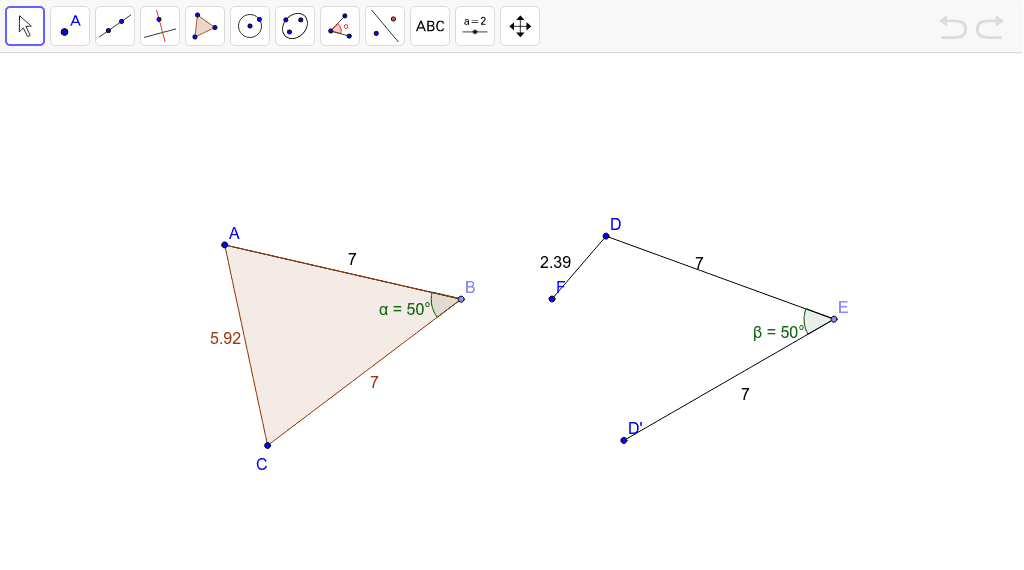
This GeoGebra example dynamically demonstrates the SAS (Side-Angle-Side) criterion for triangle congruence. By fixing two sides and the included angle, the constructed triangle is uniquely determined, visually reinforcing the concept of congruence. Core mathematical concepts include triangle congruence, corresponding sides and angles, rotation, and angle measurement. Construction highlights: Point creates points A and B, Segment builds side a, Rotate generates the second side, Angle marks the included angle α, and Polygon forms triangle poly1; a second triangle is then constructed via copying and rotation, with Angle and Segment tools verifying equal corresponding parts. Suitable for middle school geometry lessons or self-study, helping students grasp the geometric meaning of congruence theorems.
GeoGebra Commands & Parameters
Point(Circle[A, 7]) → BSegment(A, B) → aRotate(A, 50*°, B) → CAngle(A, B, C) → αPolygon(A, B, C) → poly1, a', a_1, bPoint(Circle[D, 7]) → ESegment(D, E) → cRotate(D, 50*°, E) → D'Angle(D, E, D') → βSegment(E, D') → dSegment(D, F) → e
AI Drawing Prompt Reference
Draw a triangle by fixing two sides and the included angle. The two sides are equal in length, and the angle is the same, forming a unique triangle. Another triangle is created by copying and rotating to show the same size and shape. Ensure the figure is clear, showing that corresponding sides and angles are equal.
The prompt above was compiled from the original drawing commands and is for reference only.