
Saddle Surface Sliceform
Loading the math board and drawing, please wait…
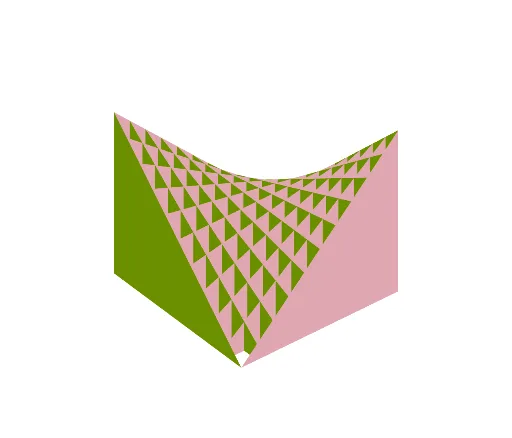
This example demonstrates a sliceform of a saddle surface, illustrating the geometric properties of a hyperbolic paraboloid. Using the GeoGebra command Sequence, a series of planes intersecting the saddle surface are constructed, forming a sliceform. This helps in understanding the solid geometry of the hyperbolic paraboloid. Suitable for high school mathematics education and students learning solid geometry.
GeoGebra Commands & Parameters
Sequence(CurveCartesian[t, w, a(t, w), t, -4, 4], w, -4, 4) → l1Sequence(Polygon[(-10, u, a(-10, u)), (10, u, a(10, u)), (10, u, -10), (-10, u, -10)], u, -10, 10, 2) → l2Sequence(Polygon[(u, -10, a(u, -10)), (u, 10, a(u, 10)), (u, 10, -10), (u, -10, -10)], u, -10, 10, 2) → l3
AI Drawing Prompt Reference
Create a sliceform of a saddle surface to illustrate the geometric properties of a hyperbolic paraboloid. Start by generating a series of curves that extend in two directions between -4 and 4, forming a grid. Then, use these curves as boundaries to draw multiple quadrilaterals, constructing a three-dimensional slice model that showcases the shape and structure of the saddle surface.
The prompt above was compiled from the original drawing commands and is for reference only.