
Rotations, Reflections, and Translations of a Triangle
Loading the math board and drawing, please wait…
In collections
MalinC's GeoGebra-book
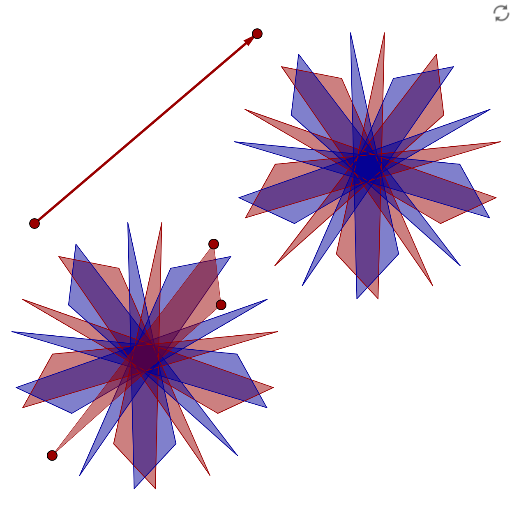
This example demonstrates a triangle being rotated four times, then reflected across the y-axis, and finally translated along a vector. Key mathematical concepts include rotation, reflection, and translation. Using GeoGebra commands such as Polygon, Rotate, Mirror, Vector, and Translate, the geometric transformations are visually illustrated. Suitable for students at the middle school level and above to learn about geometric transformations and the patterns of figure transformations.
GeoGebra Commands & Parameters
Polygon(A1, B1, C1) → D1, E1, F1, G1Rotate(A1, 72°) → A2Rotate(B1, 72°) → B2Rotate(C1, 72°) → C2Polygon(A2, B2, C2) → D2, E2, F2, G2Rotate(A2, 72°) → A3Rotate(B2, 72°) → B3Rotate(C2, 72°) → C3Polygon(A3, B3, C3) → D3, E3, F3, G3Rotate(A3, 72°) → A4Rotate(B3, 72°) → B4Rotate(C3, 72°) → C4Polygon(A4, B4, C4) → D4, E4, F4, G4Rotate(A4, 72°) → A5Rotate(B4, 72°) → B5Rotate(C4, 72°) → C5Polygon(A5, B5, C5) → D5, E5, F5, G5Mirror(A1, yAxis) → A6Mirror(B1, yAxis) → B6Mirror(C1, yAxis) → C6Polygon(A6, B6, C6) → D6, E6, F6, G6Mirror(A2, yAxis) → A7Mirror(B2, yAxis) → B7Mirror(C2, yAxis) → C7Mirror(A3, yAxis) → A8Mirror(B3, yAxis) → B8Mirror(C3, yAxis) → C8Mirror(A4, yAxis) → A9Mirror(B4, yAxis) → B9Mirror(C4, yAxis) → C9Mirror(A5, yAxis) → A10Mirror(B5, yAxis) → B10Mirror(C5, yAxis) → C10Polygon(A7, B7, C7) → D7, E7, F7, G7Polygon(A8, B8, C8) → D8, E8, F8, G8Polygon(A9, B9, C9) → D9, E9, F9, G9Vector(A, B) → uTranslate(A1, u) → A11Translate(B1, u) → B11Translate(C1, u) → C11Translate(A2, u) → A12Translate(B2, u) → B12Translate(C2, u) → C12Translate(A3, u) → A13Translate(B3, u) → B13Translate(C3, u) → C13Translate(A4, u) → A14Translate(B4, u) → B14Translate(C4, u) → C14Translate(A5, u) → A15Translate(B5, u) → B15Translate(C5, u) → C15Translate(A6, u) → A16Translate(B6, u) → B16Translate(C6, u) → C16Translate(A7, u) → A17Translate(B7, u) → B17Translate(C7, u) → C17Translate(A8, u) → A18Translate(B8, u) → B18Translate(C8, u) → C18Translate(A9, u) → A19Translate(B9, u) → B19Translate(C9, u) → C19Translate(A10, u) → A20Translate(B10, u) → B20Translate(C10, u) → C20Polygon(A10, B10, C10) → D10, E10, F10, G10Polygon(A11, B11, C11) → D11, E11, F11, G11Polygon(A12, B12, C12) → D12, E12, F12, G12Polygon(A13, B13, C13) → D13, E13, F13, G13Polygon(A14, B14, C14) → D14, E14, F14, G14Polygon(A15, B15, C15) → D15, E15, F15, G15Polygon(A16, B16, C16) → D16, E16, F16, G16Polygon(A17, B17, C17) → D17, E17, F17, G17Polygon(A18, B18, C18) → D18, E18, F18, G18Polygon(A19, B19, C19) → D19, E19, F19, G19Polygon(A20, B20, C20) → D20, E20, F20, G20
AI Drawing Prompt Reference
Draw a triangle, then rotate it four times by 72 degrees each time, reflect each resulting triangle across the y-axis, and translate each triangle along vector u. Finally, draw all the generated triangles.
The prompt above was compiled from the original drawing commands and is for reference only.