
Rotations: Dynamic 3D Surface with Orthocenter and Similar Triangles
Loading the math board and drawing, please wait…
In collections
Learn 3D Calculator
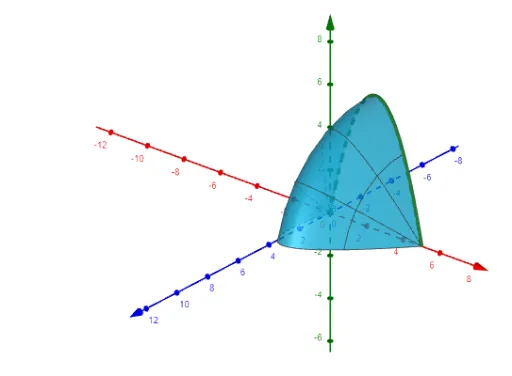
①This GeoGebra example demonstrates a rotating surface in 3D space, linked with an orthocenter and similar triangles, to visualize how rotation transforms geometric configurations. ②Core mathematical concepts include spatial rotation transformations, surface generation by revolving a curve around an axis, the behavior of the orthocenter under rotation, and properties of similar triangles and congruent segments. ③Construction highlights: the Surface command generates the surface from function f and axis a; objects n (likely a normal vector or auxiliary line) and axis a control the rotation; sliders or dynamic parameters enable continuous rotation, revealing the locus of the orthocenter and other key points. ④Suitable for high school to undergraduate geometry courses, especially for teaching analytic geometry, solid geometry, and transformation geometry, providing an intuitive visual aid for understanding 3D rotations and their mathematical representation.
GeoGebra Commands & Parameters
Surface(f(x), n, xAxis) → a
AI Drawing Prompt Reference
Create a 3D rotating surface generated by revolving a function f(x) around the x-axis. Include a helper line n to control the rotation and an axis to define the rotation. Use sliders to continuously rotate the surface and observe the dynamic changes, as well as the locus of the surface's orthocenter (the vertex of the surface).
The prompt above was compiled from the original drawing commands and is for reference only.