
GeoGebra Graphics View and Function Graphing Basics
Loading the math board and drawing, please wait…
In collections
Learn Graphing Calculator
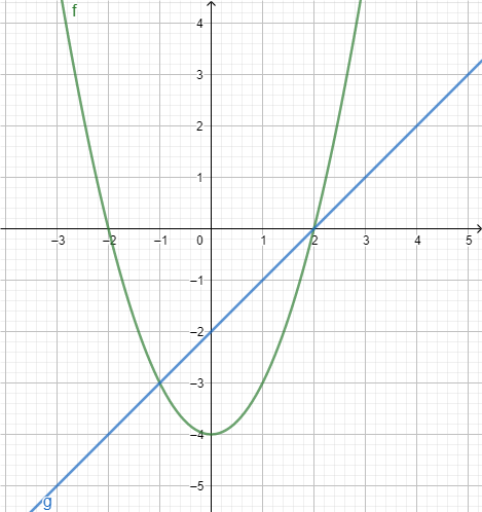
This example demonstrates the basic operations of the Graphics View in GeoGebra Graphing Calculator and how to plot function graphs. The core mathematical concepts include function representation, coordinate plane, and visualization of function graphs. Construction points: Using two function objects f(x) and g(x), entering function expressions in the Graphics View to draw corresponding graphs, intuitively showing different function behaviors. Suitable for middle school mathematics courses teaching function concepts, demonstrating linear and quadratic functions, and as an introductory exercise for GeoGebra beginners to familiarize themselves with the software's graphical interface.
GeoGebra Commands & Parameters
f(x) = x^(2) - 4g(x) = x - 2
AI Drawing Prompt Reference
Create a coordinate plane and plot two function graphs on the same axes. First draw the quadratic function y = x^2 − 4. Then draw the linear function y = x − 2. Use one shared x-axis for the input variable and one y-axis for function values, so both curves appear together in the same view, clearly showing their different behaviors.
The prompt above was compiled from the original drawing commands and is for reference only.